
How telehealth brands attribute new patients to ad campaigns
How telehealth brands tie a paid patient back to the ad that brought them: the journey, where attribution breaks, click ids, server-side conversions and models.
Written for growth and marketing leads at telehealth and DTC health brands who run paid acquisition on Meta, Google, TikTok and Microsoft
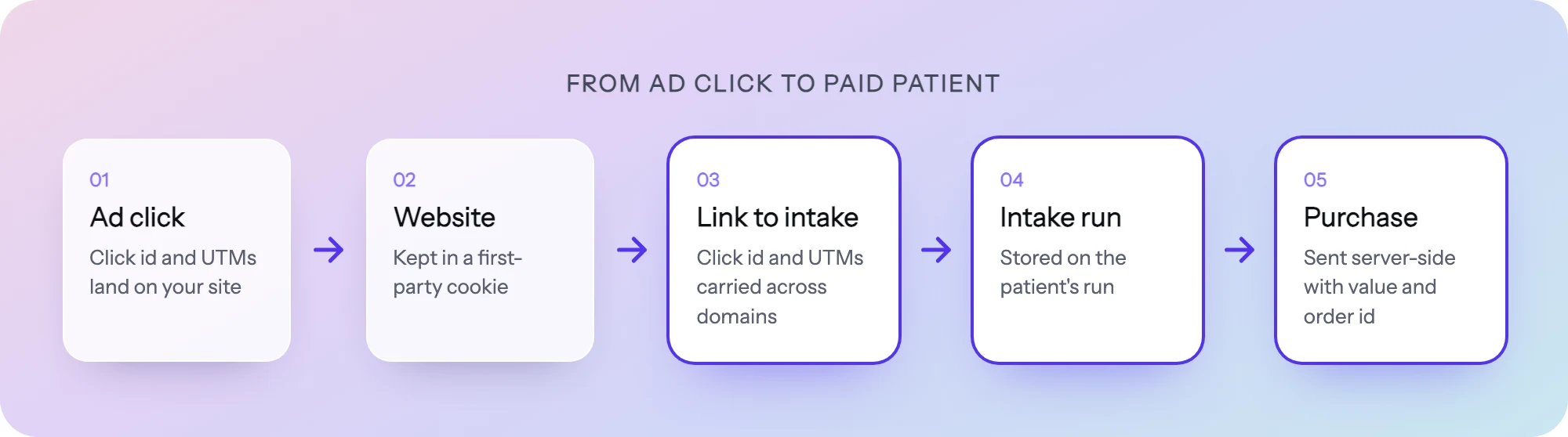
Telehealth brands attribute a new patient to an ad by capturing the ad’s click id and UTMs on the first visit, storing them with the patient’s intake record, and sending the conversion back to the ad platform from their own server once the patient actually pays. The browser pixel alone cannot do it, because the moment that matters (a clinician approves, the first order is paid) happens hours or days later, on a server, often on another domain.
What is patient attribution?
Patient attribution is the record of which ad, campaign and keyword brought a paying patient, and the link from that record back to the ad platform so its bidding learns from it.
Generic marketing attribution counts leads or checkouts. Telehealth is different in three ways:
- The money arrives after a clinical decision. A completed intake is not a sale. A clinician reviews it, and a share of patients are not approved.
- The journey crosses systems. Ad, landing page, intake flow, EHR or clinician queue, payment processor, pharmacy. Each one has its own ids.
- The data is sensitive. Intake answers can be protected health information (PHI). Anything you send to an ad platform has to leave those out.
So the question is which ad produced a patient who paid, and how to tell the ad platform without telling it anything about their health.
The telehealth patient journey
A typical paid acquisition journey has six stages:
| Stage | What happens | Where it lives | Id you can join on |
|---|---|---|---|
| 1. Ad click | Visitor clicks a Meta, Google, TikTok or Microsoft ad | Ad platform | Click id (such as fbclid, gclid, msclkid) and UTMs in the URL |
| 2. Landing page | Visitor reads, then clicks “Start” | Marketing site | First-party cookie |
| 3. Intake | Eligibility questions, intake, consent, contact details | Intake flow | Submission id, email, phone |
| 4. Clinician review | A clinician approves or declines | EHR or clinician queue | Patient or encounter id |
| 5. First purchase | Payment captured, order created | Payment processor | Order id |
| 6. Refill | Subscription renews or the patient reorders | Payment processor, pharmacy | Subscription id |
Attribution works when there is an unbroken chain of ids from stage 1 to stage 5 (and ideally 6). Every handoff is a place for it to snap.
Where attribution breaks
The landing page to intake handoff
The click id arrives in the URL of the landing page. If the “Start” button sends the visitor to an intake flow on a different domain or subdomain, and the link does not carry the parameters along, the intake never sees the click id. It is a common break, covered in depth in how to connect ad clicks to patient intakes.
Browsers make it worse. WebKit, the engine behind Safari, documents that its Intelligent Tracking Prevention deletes cookies created in JavaScript after seven days without user interaction with the site, and caps them at 24 hours on a landing page reached through link decoration from a known tracker. A patient who clicks on Monday and comes back the next week may arrive with no cookie at all.
The intake to clinician review handoff
Intake completion is the last event most pixels see. Approval happens in an EHR or clinician dashboard with no tag on it, so if the click id is not stored on the intake record, nothing downstream can find it.
The review to payment handoff
Many brands authorize a card at checkout and capture it after approval, on the server. A pixel on the thank-you page counts the authorization, including patients later declined, and never sees the capture.
The first order to refill handoff
Refills and renewals are often a large part of a patient’s value, and they usually never touch the website. If your ad platform only ever hears about the first order, it optimizes for cheap first orders, not for patients who stay.
Click ids and UTMs: what to capture
Capture every one of these on the first page view, store them on the visit, and carry them onto the intake record:
| Parameter | Platform | What it identifies |
|---|---|---|
gclid | Google Ads | One ad click on the web |
gbraid, wbraid | Google Ads | Clicks that move between iOS apps and the web; Google’s API documentation lists both beside gclid |
fbclid | Meta | One click; Meta’s Conversions API expects it wrapped as an fbc value |
msclkid | Microsoft Ads | One click; Microsoft describes it as a 32 character GUID, unique per click |
utm_source, utm_medium, utm_campaign, utm_content, utm_term | Any | The campaign as you named it |
A few practical rules:
- Store the raw click id exactly. Meta’s documentation says the fbclid is case sensitive and should not be altered. It builds
fbcasfb.<subdomainIndex>.<creationTime>.<fbclid>, and says to use the time you first saw the fbclid when you build it on a server. - Keep first touch and last touch. Each platform will want its own id.
- Never put PHI in a UTM.
utm_campaign=glp1-diabetes-women-50is a health condition in a URL that every tag on the page can read. Use neutral campaign codes and keep the meaning in a spreadsheet.
Server-side conversions: telling the platform who paid
Once the click id sits on the intake record, the conversion can go back to the ad platform from your server when the meaningful event happens. Each platform has its own route: Meta’s Conversions API, Google Ads offline conversion import and Enhanced Conversions, TikTok’s Events API, and Microsoft Advertising’s offline conversions. Our guide to server-side conversion tracking in healthcare compares them.
What to send:
- The click id (or a hashed email or phone where the platform supports matching on it).
- The event name you chose, such as
Purchaseor a customPatientApproved. - The time of the conversion and the value.
- An order id, so the platform can deduplicate if a browser tag also reported the same purchase.
What not to send: answers, conditions, medications, date of birth, or anything else from the intake. Regulators are watching this closely. In July 2023 the FTC and HHS sent a joint letter to approximately 130 hospital systems and telehealth providers warning about the Meta/Facebook pixel and Google Analytics. Our HIPAA overview covers what to keep out.
Timing matters too. Microsoft says a conversion uploaded more than 90 days after the last click will not be imported, and asks advertisers to wait an hour after a click before uploading. Check each platform’s own import window before you design a delay, such as a 14 day refund period, into your pipeline.
Attribution windows
An attribution window is how long after a click a conversion can still be credited to it. Telehealth journeys are longer than ecommerce ones, so defaults matter.
- Google Ads says the default click-through conversion window is 30 days, and that it can be set from 1 to 30, 60 or 90 days for Search and Display depending on the conversion source.
- Microsoft Advertising lets an offline conversion goal track up to 90 days back.
- Meta and TikTok each set windows in their own ads managers; read the current setting on the account rather than assuming a default.
Set the window to cover the real gap between click and payment in your own data. A window shorter than your long tail throws those patients away and makes a channel look worse than it is.
Attribution models
The model decides how credit is split when a patient touched several ads.
| Model | How credit is assigned | When it fits telehealth | Watch out for |
|---|---|---|---|
| Last click | All credit to the final ad clicked | Simple reporting, short journeys | Undervalues the awareness ads that started the journey |
| First click | All credit to the first ad clicked | Judging which channels find new patients | Ignores what closed them; not available inside Google Ads any more |
| Linear | Equal credit to every touch | Internal reporting across many touches | Treats a retargeting click like a discovery click |
| Data-driven | The platform weights touches from its own data | Bidding inside one platform | A black box, and each platform only sees its own touches |
| Platform-reported | Each platform claims its own conversions | Feeding bidding algorithms | The totals add up to more patients than you have |
Google says data-driven is now the default for most conversion actions, and that first click, linear, time decay and position-based models are no longer supported in Google Ads; the options there are data-driven and last click. You can still run first touch and linear views on your own data, because you hold every touch on the intake record.
A workable setup for most brands: let each platform use its own model for bidding, and keep one internal report, built from your own records, that assigns each paid patient to one source. That internal report is the one you use for budget decisions.
What “a patient” means for ROAS
Return on ad spend is revenue divided by spend, and the hard part in telehealth is choosing the revenue. Define the conversion before you compare channels:
| Conversion you count | What it tells you | Problem |
|---|---|---|
| Intake started | Ad and landing page pull | Says nothing about fit or payment |
| Intake completed | The flow converts | Includes patients who will be declined |
| Clinician approved | You reached eligible patients | Not yet revenue |
| First order paid | Real revenue | Ignores retention |
| Paid and still active at 90 days | Patient value | Arrives too late to steer daily bidding |
Most brands send two signals: an early one (intake completed) so the algorithm has enough volume to learn, and a paid one (first order paid, with value) that they treat as the real conversion. Report ROAS on the paid one. Some platforms also accept corrections: Microsoft, for example, lets you restate the value of an offline conversion or retract it, which fits a refund or a declined patient.
Step-level data from the intake itself tells you where the denominator is lost. If a campaign produces many starts and few completions, the problem may be the flow, not the ad. Step-level analytics and A/B testing show which screen loses those visitors.
How to do it in PathwAI
PathwAI covers the intake side and the conversion side in one place.
- Build the flow on your own domain. An AI agent drafts the eligibility, intake, consent and checkout steps from a plain-English description, and your team reviews and approves it in the visual builder. Flows run on your own domain or embedded on your site, so there is no cross-domain hop to lose the click.
- Capture the click. The Data Platform captures click ids (gclid, fbclid, msclkid) and UTMs on the visit and attributes conversions to the ad, campaign and keyword.
- Gate on consent. Consent is a first-class step, timestamped and stored with the intake. Ad platforms receive identifiers only for visitors who consented.
- Send conversions server-side. Conversions go to Meta (Conversions API), Google Ads (Enhanced Conversions and Customer Match), TikTok (Events API) and Microsoft Ads (offline conversions). Email and phone are SHA-256 hashed, and PHI such as date of birth and condition is stripped before any event leaves.
- Take payment in the flow. Checkout steps run on Stripe or Authorize.Net, so the paid event sits in the same journey as the click.
- Find the leak. Step-level completion and drop-off show where each campaign’s visitors stop, and A/B tests compare copy, step order or routing against a control.
There are no third-party ad pixels: only first-party cookies, with the script loading from your own domain. A BAA is available on the Enterprise plan. See pricing for how plans are scoped.
Checklist
- The landing page captures all click ids and UTMs on the first view
- The “Start” link carries them into the intake, or the intake runs on the same domain
- Click ids and UTMs are stored on the intake record, first and last touch
- Consent is collected before any identifier goes to an ad platform
- Conversions are sent server-side at approval or payment, with an order id
- No intake answers, conditions or medications leave in any event
- One internal report assigns each paid patient to one source
- ROAS is reported on paid patients, not intake completions
Frequently asked questions
Can I attribute patients with the Meta Pixel alone?
Not reliably. The pixel sees browser events, while approval and payment usually happen on a server later. On intake pages it can also send health information to Meta, which the FTC and HHS have warned about. Send the paid conversion from your server instead.
Which event should I optimize ads for: intake completed or purchase?
Usually both, with different jobs. Intake completed gives the algorithm volume to learn from. Purchase, with a value, is the conversion you judge spend on. If purchase volume is high enough, optimize for it directly.
Why do Meta and Google together claim more patients than I have?
Each platform credits conversions to its own touches using its own model and window. A patient who clicked both ads counts in both. Use your own records, with one source per paid patient, for budget decisions.
How long should my attribution window be?
Long enough to cover the time from click to payment for most of your patients. Measure that gap in your own data first. Google’s default click-through window is 30 days and Microsoft’s offline import accepts conversions up to 90 days after the last click.