
How to launch a new telehealth treatment program without engineering
A launch checklist for a new telehealth program: clinical criteria, the flow, consent, pharmacy and EHR hookups, domain, tracking, soft launch and iteration.
Written for operators, growth leads and product managers at telehealth and DTC health brands adding a new condition or product line
You can launch a new telehealth treatment program without engineering if you treat it as a sequence of decisions rather than a software project. Your clinicians write the eligibility criteria, an operator turns them into an intake flow (from a template or an AI draft), and the pieces that touch other systems (consent, payment, pharmacy, EHR, tracking) are connected through integrations instead of custom code. The work that takes time is clinical and legal review, not building screens.
Below is the checklist for a new condition or product line: what has to exist, who owns each step, and the order to do it in.
What is a telehealth treatment program?
A telehealth treatment program is everything a patient goes through to get one treatment from your brand online. For a new line such as hair loss, HRT or a weight loss medication, it usually includes:
- A landing page and an ad or email campaign that sends traffic to it.
- An eligibility quiz that screens out patients the treatment is not right for.
- A medical intake that collects the history a clinician needs.
- Consent to treatment and to telehealth, plus your privacy terms.
- Checkout, often a subscription.
- A clinician review in your EHR or provider network.
- Fulfillment through a pharmacy, then follow-ups and refills.
A brand that already runs one program has most of this in place. A new program mostly means new clinical criteria, a new flow and new connections for whatever changes.
What has to exist before launch
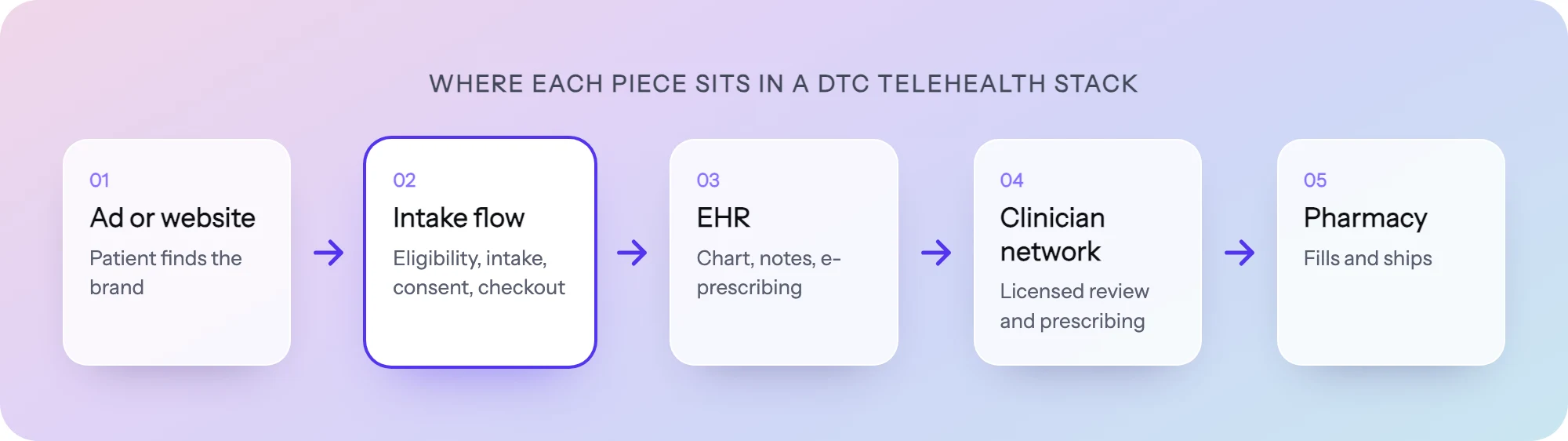
Before anyone builds a screen, confirm these are decided. Each one blocks a later step if it is missing.
| Piece | Who decides | Why it blocks launch |
|---|---|---|
| Clinical protocol and eligibility criteria | Your medical director and clinicians | The flow is a translation of these rules. Without them you are guessing. |
| Provider coverage | Clinical operations | You can only accept patients where a licensed clinician can treat them. |
| Pharmacy or fulfillment partner | Operations | Determines what the intake must collect and where the order goes. |
| EHR or clinician review tool | Clinical operations | Determines where intake data has to land and in what shape. |
| Consent and terms language | Clinical and legal teams | Patients must agree before treatment. Wording needs sign-off. |
| Pricing and plan structure | Growth and finance | Checkout cannot be built until plans and prices are fixed. |
| Domain and brand | Marketing | The flow URL and the tracking setup depend on it. |
| Marketing claims | Marketing and legal | Ads and landing copy need support before spend starts. |
If you are still choosing an EHR, our comparison of EHRs for DTC telehealth covers what each one expects from intake. If the new line is a peptide or compounded product, the peptide brand playbook walks through the provider network and pharmacy side in more depth.
Step 1: get the clinical criteria in writing
The single biggest source of delay is building a flow before the clinical rules are final. Ask your clinicians for a written document, even a rough one, that answers:
- Who is eligible. Age range, conditions, measurements (for example BMI for a weight program), states you serve.
- Who is excluded, and why. Contraindications, medications, pregnancy, prior reactions. Each exclusion becomes a routing rule.
- What needs a human decision. Answers that should not auto-disqualify but must be flagged for clinician review.
- What the clinician needs to see. The history, labs, photos or ID they need to make a decision.
- What to say to ineligible patients. A clear message, a waitlist, or another treatment you offer.
Eligibility is a clinical decision. The operator’s job is to encode it faithfully, not to set it. Keep the document versioned so the flow can be checked against it later.
Step 2: build the flow from a template or an AI draft
With criteria in hand, you need an eligibility quiz, an intake and a checkout that follow them. There are three common ways to get there.
| Approach | Good for | Watch out for |
|---|---|---|
| Start from a template | Common programs (weight loss, aesthetics) where the structure is well known | You still have to replace the criteria with your clinicians’ own |
| Ask an AI agent for a draft | New or unusual programs, or when you want a first version fast | The draft is a starting point. Every rule and every line of copy needs review |
| Build in a form tool by hand | Simple screeners with few branches | Branching, consent records and payments often need workarounds or code |
| Have engineering build it | Very custom experiences | Every later change waits for a sprint |
Whichever route you pick, structure the flow the same way:
- Goal and context first. Open with what the patient wants, not their medical history.
- Hard stops early. Put the questions that most often disqualify near the start, so ineligible patients learn quickly and kindly.
- One topic per screen. Short screens are easier to answer on a phone and easier to measure.
- Medical history in groups. Medications, conditions, allergies, each as its own short section.
- Consent before checkout. The patient acknowledges before paying.
- Checkout last. Show the plan, the price and what happens next.
Our guides to patient psychology in intake flows and the GLP-1 intake flow go deeper on question order and copy.
Step 3: make consent a real step
Consent is not a checkbox in the footer. For a new program you usually need consent to treatment, consent to telehealth, and agreement to your privacy terms, each written or approved by your clinical and legal teams. In the flow:
- Make it a step the patient must complete before continuing.
- Store a timestamp and the exact version of the text they agreed to, with the intake record.
- Keep marketing consent separate from treatment consent. A patient can agree to treatment without agreeing to ads or emails.
Step 4: connect payment, pharmacy and the EHR
This is where “without engineering” is won or lost. Map every place intake data has to go and pick an integration for each.
| Connection | What it carries | Typical options |
|---|---|---|
| Payment | Card, plan, subscription | A payment processor such as Stripe or Authorize.Net |
| EHR or clinician review | Intake answers, consent record, uploads | Native EHR integration, or a webhook into your EHR |
| Pharmacy or fulfillment | Approved order, shipping details | Usually triggered from the EHR after a clinician approves |
| CRM and lifecycle email | Contact, program, status | HubSpot, Klaviyo, Braze or similar |
| Scheduling | Consult booking, if the program needs a live visit | A booking tool such as Cal.com |
| ID verification | Identity check, if required by your protocol | A verification provider such as Persona |
Two rules keep this clean. First, decide which system owns each piece of data (the EHR owns the clinical record, the CRM owns marketing status) and do not keep two copies that can drift. Second, test every connection with a fake patient end to end before launch, including the ineligible path and a declined card.
Step 5: set up the domain and the tracking
Run the flow on your own domain, or embed it on your site, so patients stay inside your brand.
Tracking is where new programs most often create privacy risk. In 2023 the FTC and HHS sent letters to about 130 hospital systems and telehealth providers warning that tracking technologies such as the Meta pixel and Google Analytics can send sensitive health data to third parties. Brands outside HIPAA are not off the hook either: the FTC says its Health Breach Notification Rule applies to most health apps and similar technologies that HIPAA does not cover.
For a new program, that means:
- Do not drop third-party ad pixels on intake or checkout screens.
- Send conversions server-side, with identifiers hashed and health details stripped.
- Only send data for visitors who consented to marketing.
- Capture click ids and UTMs on the visit so you can still attribute patients to campaigns.
Our guide to server-side conversion tracking in healthcare covers how this works in practice.
Step 6: review the marketing claims
Ads and landing pages for a new treatment need the same care as the flow. The FTC’s health products compliance guidance says health-related claims need “competent and reliable scientific evidence.” Have your clinical and legal teams sign off on landing copy, ad copy and any outcome language in the flow itself before you spend on traffic.
Step 7: soft launch, measure, iterate
Do not open the program to full ad spend on day one. A soft launch catches the problems that only real patients find.
- Internal run. Have staff complete the flow as several personas: eligible, ineligible, edge cases, mobile and desktop.
- Clinician check. A clinician reviews test submissions in the EHR and confirms they have what they need.
- Small traffic. Send a limited budget or an email to an existing list.
- Measure by step. Look at completion and drop-off for each screen, not only the overall conversion rate. A single screen losing patients is usually a wording or order problem.
- Fix and test. Change one thing at a time, ideally as an A/B test against the current version.
- Scale. Increase spend once the flow, the clinical queue and fulfillment all hold up.
Realistic timeline
How long this takes depends far more on decisions than on building. If clinical criteria, consent language, pharmacy and pricing are settled, the flow itself can be drafted, reviewed and connected quickly. If any of them are still open, that open item sets the pace. Plan the calendar around clinical and legal review, and start those conversations before anything else.
How to do it in PathwAI
PathwAI is an AI-native patient acquisition platform. An agent builds the flow and your team approves it. Here is how the steps above map to it:
- Draft the flow. Describe the program in plain English to the PathwAI AI agent, including your clinicians’ criteria, and it generates a complete flow: steps, patient-facing copy and routing. The result is a draft; nothing publishes without your team’s explicit approval, and consent wording must be reviewed by your clinical or legal team. No patient data is used in generation prompts.
- Or start from a template. The templates include a GLP-1 eligibility and intake flow and an aesthetics lead qualifier.
- Encode the criteria. Routing rules branch on any answer or combination of answers. Eligible patients continue to intake and checkout; ineligible patients get a custom message, a waitlist or another treatment path.
- Consent as a step. Patients must acknowledge before continuing, and consent is timestamped and stored with the intake data.
- Payment, booking and ID. Steps can take payments (Stripe, Authorize.Net), book appointments (Cal.com) and verify ID (Persona).
- Integrations. PathwAI has 34 integrations across payments, CRM, EHR, analytics and ads, including Healthie, CarePortals, HubSpot, Klaviyo, Braze, Segment, Zapier and webhooks.
- Your domain. Flows run on your own domain or embedded on your website. Share preview links for team review before publishing.
- Tracking. The Patient Data Platform sends conversions server-side to Meta, Google Ads, TikTok and Microsoft Ads, with identifiers SHA-256 hashed and PHI stripped, only for visitors who consented. It uses first-party cookies and no third-party ad pixels.
- Measure and iterate. Step-level completion and drop-off show where patients leave, and A/B tests of copy, step order or routing run against a control.
Most teams ship a working first draft within a day or two of their demo call. A BAA is available on the Enterprise plan.
Launch checklist
- Clinical criteria written, versioned and signed off by clinicians
- Provider coverage confirmed for every state you will accept
- Pharmacy or fulfillment partner and order handoff agreed
- Flow built: eligibility, intake, consent, checkout
- Every exclusion mapped to a routing rule, checked against the criteria
- Consent and privacy text approved by clinical and legal teams
- Payment, EHR, CRM and other integrations tested end to end
- Ineligible path and declined card tested
- Flow on your own domain or embedded on your site
- No third-party ad pixels on intake or checkout; server-side conversions with consent
- Ad and landing claims reviewed
- Soft launch run, step-level drop-off reviewed, first fixes shipped
Frequently asked questions
Do I need engineers to launch a new telehealth program?
Not for the flow itself if you use a tool that handles branching, consent, payments and integrations. You may still want technical help for an unusual EHR or pharmacy connection that has no ready integration or webhook.
Who should set the eligibility criteria?
Your clinicians. The operator turns their written criteria into routing rules, and a clinician should check the finished flow against them before launch.
Can I reuse the intake from an existing program?
You can reuse the structure, such as contact details, medication history and checkout. The eligibility questions, exclusions and consent language should be rewritten for the new treatment and reviewed again.
How do I track ad performance without exposing health data?
Avoid third-party pixels on intake screens, send conversions server-side with hashed identifiers and no health details, and only for visitors who consented to marketing.
What usually delays a launch?
Open decisions: clinical criteria that keep changing, consent wording waiting on legal, an undecided pharmacy, or pricing that is not final. Settle those first and the build moves quickly.