
Managing patient intake for multiple telehealth brands
How groups running several telehealth brands keep intake separate where it must be (domain, consent, data, tracking) and shared where it should be.
Written for operators, growth leads and product managers at groups running several telehealth or DTC health brands
To manage patient intake for several telehealth brands, give each brand its own workspace (its own flows, domain, consent wording, integrations and tracking) and share only what carries no patient data: templates, question blocks and design rules. The brand boundary should be a data boundary. Everything a patient sees, signs or sends belongs to one brand, while the way your team builds intake can be the same everywhere.
This guide is for groups that run a weight loss brand next to a hormone brand next to a hair loss brand, or one operator that runs programs for several clinics. It covers what to separate, what to share, and how to set it up so launching brand number four takes days, not a quarter.
What is multi-brand intake?
Multi-brand intake is one operating team running patient intake for two or more consumer brands, each with its own name, look, offer and often its own clinical partner. The patient should never notice the shared machinery. A person who starts a quiz on one brand’s site sees that brand’s name, colors, consent and checkout, and their answers go to that brand’s clinicians and systems only.
The hard part is not building the second brand. It is keeping brands from leaking into each other six months later: a consent page that still names the old brand, a webhook that sends both brands’ intakes to one EHR, an ad audience that mixes patients from two programs, a conversion report that cannot say which brand paid for which patient.
Why one shared form for every brand breaks
Many groups start by cloning one form and swapping the logo. It works for a month. Then the problems show up:
- Consent drifts. Each brand has its own terms, privacy notice, telehealth consent and sometimes its own medical group. A cloned form carries the wrong names unless someone catches it.
- Data mixes. One form account with several brands in it means one export, one user list and one set of integrations. Separating who can see which patients becomes a manual task.
- Tracking blurs. If several brands send conversions through one setup, attribution and audiences need careful filtering, and one mistake sends one brand’s patients into another brand’s campaign.
- Changes collide. A fix for one brand’s eligibility rules breaks another brand that happened to share the step.
The fix is to decide, up front, which layer is shared and which is per brand.
One setup, several brands
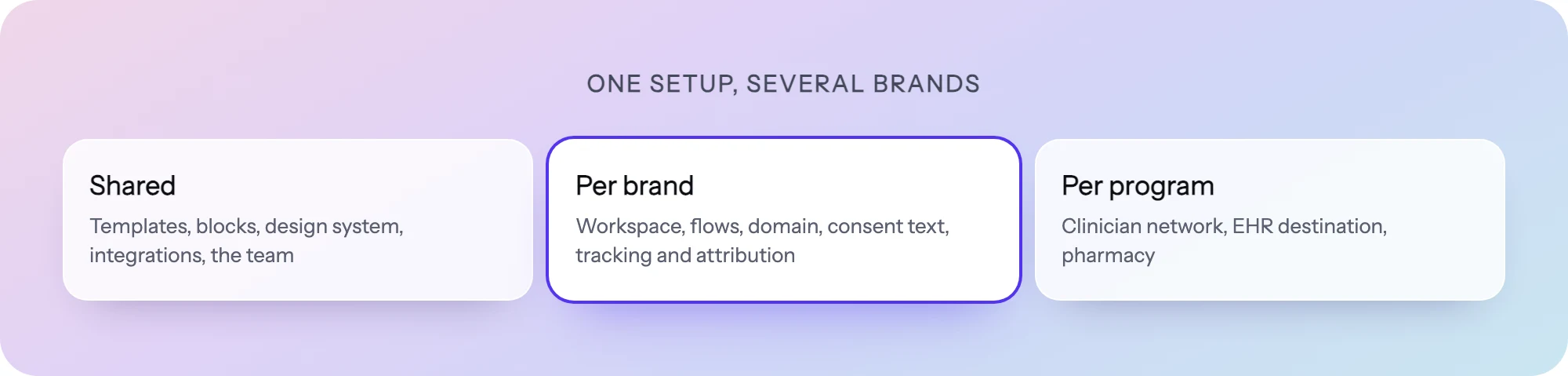
Think in two layers.
The shared layer is how your team works: templates for common flows, a library of well-written question blocks, design rules, naming conventions, a QA checklist and a launch process. None of it holds patient data, so sharing it is safe and saves the most time.
The per-brand layer is everything a patient touches or that holds their data: the domain, the look, the consent text, the routing to a clinician network, the EHR and CRM connections, payment accounts, ad tracking and reporting.
| Layer | Shared across brands | Separate per brand |
|---|---|---|
| Flow structure | Templates, reusable question blocks | The published flow and its routing rules |
| Look and feel | Design rules, component patterns | Theme: colors, fonts, logo, tone of copy |
| Where it runs | Launch checklist | Domain or embed on the brand’s own site |
| Consent | Review process with legal | Consent wording, linked terms, medical group name |
| Clinical routing | Routing patterns (eligible, ineligible, waitlist) | Eligibility criteria set by each brand’s clinicians, target clinician network |
| Systems | Integration playbook | EHR, CRM, payment and scheduling accounts |
| Tracking and ads | Event naming, consent rules | Conversion destinations, ad accounts, audiences |
| Reporting | Metric definitions | Funnel and A/B results per brand |
Step 1: give each brand its own workspace
Start with the boundary. Each brand (or each clinic you run a program for) gets its own workspace with its own flows, users, integrations and data. Team members who work across brands are invited to each workspace they need; a contractor on one brand never sees another brand’s patients.
This also makes the hard conversations easy. If a brand is sold, spun out or moves to another partner, its intake history, settings and data leave as one unit instead of being untangled from a shared account.
Step 2: share templates and blocks, not live flows
The time saving in a multi-brand group comes from not writing the same intake twice. A weight loss brand and a hormone brand both ask for date of birth, state of residence, current medications, allergies and a contact method. Write those blocks once, review the wording once, and start every new flow from them.
Two rules keep this safe:
- Copy, do not link, at the flow level. A brand’s live flow should be its own copy. When the shared version improves, roll the change into each brand on purpose, with a preview, rather than having one edit change every brand at once.
- Keep the shared library clinical-neutral. Eligibility thresholds, contraindications and exclusion lists are set by each brand’s clinicians. A shared block can hold the question; the routing that decides who is eligible belongs to the brand.
Start new brands from templates rather than a blank page, and keep a short list of blocks that have already been through legal and clinical review.
Step 3: one design system, a theme per brand
Patients judge a brand in the first screen. Every brand needs its own colors, type, logo, button style and voice, but the components underneath (a medication list, a BMI step, a date picker, a payment step) can be the same.
Set up one design approach and apply a theme per brand. Changes to how a component works are made once; changes to how a brand looks stay inside that brand. Write a one-page voice note per brand too: one brand may say “your provider”, another “your clinician”. Small wording differences are what make two flows feel like two companies.
Step 4: a domain and consent per brand
Run each brand’s flow on that brand’s own domain or embed it on the brand’s site. A patient who clicks an ad for one brand should never land on a URL that names another brand or your parent company.
Consent needs the most care. For each brand, check:
- The consent step names the right brand, the right medical group and links that brand’s own terms and privacy notice.
- Patients must acknowledge consent before continuing, and the acknowledgment is stored with a timestamp alongside that brand’s intake.
- Marketing consent (ads, email, SMS) is asked separately from treatment consent, and only where the brand actually uses it.
- Consent wording is reviewed by each brand’s clinical or legal team, not copied from a sister brand.
State laws can apply even when HIPAA does not. Washington’s Attorney General says the My Health My Data Act covers personal health data that falls outside HIPAA and applies to businesses that target products or services to Washington consumers. The FTC says its Health Breach Notification Rule covers certain non-HIPAA health apps and their service providers, and that a breach includes a company’s disclosure of covered information without a person’s authorization, not only a hack. Ask counsel which rules apply to each brand; the answer can differ between brands in one group.
Step 5: route to the right clinicians and systems
Each brand usually has its own clinical partner, EHR or pharmacy, and sometimes its own payment processor. Wire integrations per brand, not centrally. A misrouted intake is a privacy incident, not just a bug.
Inside one brand, routing does the sorting: eligible patients go on to intake and checkout, ineligible patients get a clear message, a waitlist or another treatment path, and patients in states the brand does not serve are stopped before they pay. If one brand serves several programs (for example two medications with different criteria), route on answers to the right program and the right clinician queue.
If you are still choosing a system of record for a new brand, our guide to the best EHRs for telehealth and DTC brands compares the common options.
Step 6: attribution and ads per brand
Ad tracking is where multi-brand groups most often mix data. Keep it separate:
- One set of ad accounts and conversion destinations per brand.
- Conversions sent server-side, with identifiers hashed and health details stripped, and only for patients who consented.
- Audiences built per brand from that brand’s own behavior (completed intake, dropped at checkout, interested in a product). Never build a lookalike for one brand from another brand’s patients unless every brand’s terms and counsel allow it.
- Click ids and UTMs captured per visit so each brand can see which ad, campaign and keyword brought a patient.
Step 7: measure and test each brand on its own
A blended conversion rate across brands hides everything useful. Track step-level completion and drop-off per brand, and run A/B tests inside one brand at a time. What lifts a hair loss quiz may hurt a weight loss quiz, because patients arrive with different questions and different levels of urgency.
When a test wins in one brand, treat it as a hypothesis for the next brand, not a rule. Re-run it there before rolling it out.
How to do it in PathwAI
PathwAI is an AI-native patient acquisition platform. Here is how the setup above maps to it.
- A workspace per brand. Each brand gets its own workspace with its own flows, team access, integrations and Data Platform, and its flows run on that brand’s own domain or embed on its website.
- Draft new brands with the AI agent. Describe the program in plain English and the AI agent generates a complete flow: steps, patient-facing copy and routing. It is a draft: your team reviews it and nothing publishes without explicit approval. No patient data is used in generation prompts.
- Start from templates. Begin from a template, such as GLP-1 eligibility and intake, and adapt it to the brand rather than rebuilding common steps.
- One canvas for the whole funnel. Eligibility, intake, consent and checkout sit on one visual canvas, with routing rules that branch on any answer or combination of answers. Steps can take payments (Stripe, Authorize.Net), book appointments (Cal.com) and verify ID (Persona).
- A theme per brand. Apply each brand’s colors, fonts and style with themes.
- Consent as a step. Patients must acknowledge consent before continuing; it is timestamped and stored with that brand’s intake data.
- Per-brand integrations. Connect each workspace to that brand’s EHR, CRM and payment accounts from 34 integrations, including Healthie, HubSpot, Stripe, Klaviyo and webhooks.
- Tracking per brand. The Data Platform sends conversions server-side to Meta, Google Ads, TikTok and Microsoft Ads with hashed identifiers, only for visitors who consented, and attributes each conversion to the ad, campaign and keyword.
- Analytics and tests per brand. See completion and drop-off for every step and run A/B tests of copy, step order or routing against a control.
A BAA is available on the Enterprise plan. See the HIPAA page for what PathwAI does and does not cover.
Launch checklist for a new brand
- New workspace created; only the people who need it are invited.
- Flow started from a template or reviewed blocks, not cloned from a live sister brand.
- Theme applied; no other brand’s name, logo or color anywhere, including emails and error messages.
- Runs on the brand’s own domain or embed; preview links reviewed by the team.
- Consent names the right brand and medical group, links the right terms, and was reviewed by that brand’s clinical or legal team.
- Eligibility criteria confirmed by the brand’s clinicians; ineligible and out-of-state paths tested.
- EHR, CRM, payment and scheduling connected to the brand’s own accounts; a test intake checked end to end.
- Ad tracking sends to the brand’s own ad accounts, consent-gated; test conversion confirmed.
- Step-level analytics live; first A/B test planned.
Frequently asked questions
Should each telehealth brand have its own intake account?
Yes, or at least its own workspace. Separate workspaces keep patient data, team access, integrations and tracking apart, which makes privacy reviews, audits and a future sale or spin-out of a brand much simpler.
Can brands share the same questions?
Yes. Shared question blocks and templates save the most time and carry no patient data. Keep the eligibility logic per brand, because each brand’s clinicians set its criteria.
Can one patient be in two of our brands?
They can be a patient of both, but treat them as two separate records unless your terms, consent and counsel say otherwise. Do not move answers, audiences or ad data between brands by default.
How fast can a group launch a new brand’s intake?
It depends on review time more than build time. With templates, reviewed blocks and a theme ready, the build is short; consent review, clinical sign-off and integration testing usually set the pace.
Do we need a separate BAA for each brand?
Ask counsel. It depends on which entity is the covered entity for each brand and how your contracts are structured. Some groups sign per legal entity, others per brand.