
How to build a telehealth intake funnel that converts
The telehealth intake funnel as seven steps, from ad to what happens next, with one principle per step, step-level measurement, A/B tests and PHI-safe tracking.
Written for growth leads, operators and product managers at telehealth and DTC health brands
A telehealth intake funnel converts when every step does one job and hands the patient to the next one without a surprise. Build it as a sequence: the ad or landing page sets an expectation, the first screen asks about the patient’s goal, eligibility screening comes early, the medical intake asks only what a clinician needs, consent sits where it applies, checkout shows the full price after a recommendation, and the last screen says what happens next. Then measure every screen on its own, test one change at a time, and track ad conversions without sending health answers to the ad platforms.
Below are the seven steps, one principle for each, and how to measure and improve the funnel once it is live. There is no promised conversion rate here: your own step-level data is the only number worth acting on.
What is a telehealth intake funnel?
A telehealth intake funnel is the path a visitor takes from an ad or a “Get started” button to a paid or booked visit with a clinician. It usually covers goals, eligibility screening, medical history, contact details, consent, payment and a hand-off to a provider.
It differs from a clinic intake form in one way that changes everything: it has three jobs, not one.
- Clinical. Collect what a licensed provider needs to decide whether a treatment is appropriate, by criteria your clinicians set.
- Commercial. Turn a visitor into a patient who has paid or booked.
- Operational. Route people. Eligible patients go on to checkout; others see another treatment, a waitlist or a clear “not a fit” message.
“Converts” means doing all three: more eligible patients finish, and the ones who should not continue find out early and kindly.
The funnel, step by step
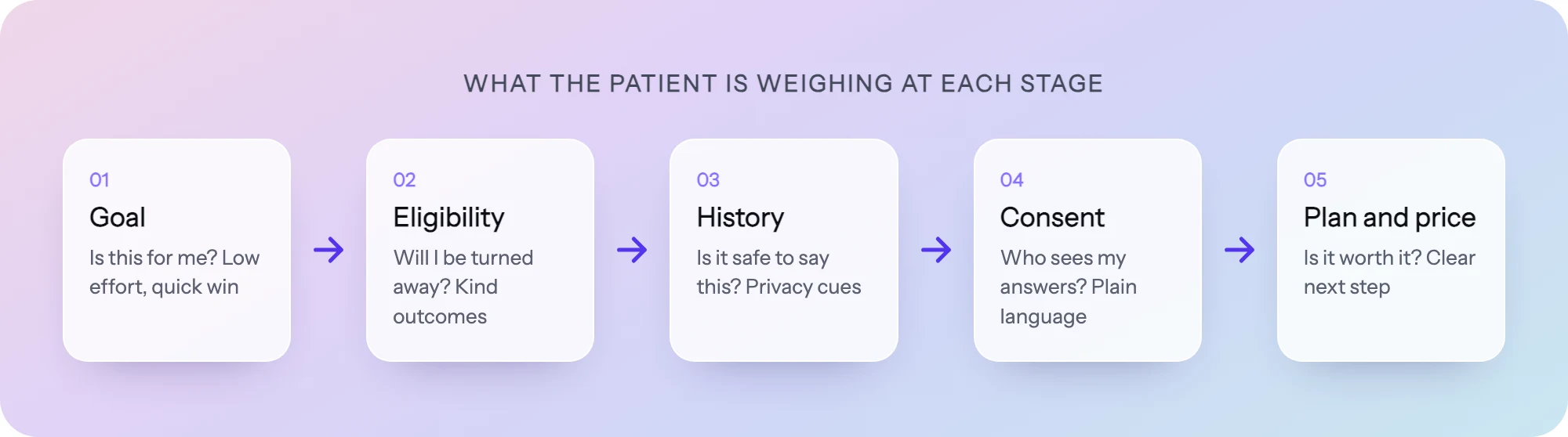
Each step has one principle, drawn from our teardown of how Hims, Ro and Hers build intake flows (13 public flows rebuilt) and our guide to patient psychology in intake flows. Treat each as a default to test, not a guarantee.
Step 1: The ad or landing page sets one expectation
Principle: the first screen of the flow must match the promise of the click.
A patient who clicks an ad about weight loss and lands on a generic “Tell us about yourself” form has to work out whether they are in the right place. Make the landing page or the flow’s first screen repeat the treatment and the format (an online visit with a licensed clinician).
Name the program in the first headline, give an honest time estimate (“About 5 minutes”), and say how pricing works (“Plans shown after your answers”) so the later price is not a surprise.
Step 2: Ask about the goal first
Principle: start with an easy, positive question about the patient, not their history or contact details.
In our teardown, most flows open with what the patient wants. Hims and Happy Heads ask about the patient’s goal before any medical history; Alloy and Eden open with symptoms. The first tap is easy, it is about the person, and the answer lets you personalize the copy that follows.
- Do: “What would you most like help with?” with three or four clear options.
- Don’t: open with email, phone and date of birth before the patient has seen anything about their own situation.
Where to capture email is a trade-off: early saves a lead you can follow up, later asks less of someone who has not seen value yet. Test it.
Step 3: Screen for eligibility early
Principle: the patient should learn they are not a fit on screen three, not after entering a card number.
Put the hard eligibility questions (the ones your clinicians say rule a treatment out) near the front. In our teardown, Rugiet asks about medications such as nitrates early in its ED flow, and Phoenix screens cardiovascular history before showing any treatment.
Routing matters as much as the questions. A patient who does not meet the criteria should get a clear reason and a next step your clinical team approves: a waitlist, another program, or a suggestion to talk with their own doctor. Which answers disqualify, and what to show instead, are clinical decisions, not growth ones.
Step 4: Keep the medical intake short and calm
Principle: ask only what a clinician will use, one question or tight group per screen, in plain words.
This is the longest part of the funnel, and where most patients decide whether to keep going. In our teardown the flows ran from 7 screens (Hers) to 17 (Eden), and length followed clinical need more than brand style. The longer flows lean on a few techniques:
- Phases. Named sections (“Your health”, “Your medications”) make the end feel close.
- Yes/no and pictures. A yes/no takes one tap. Ro uses a visual selector for hair loss patterns instead of medical terms.
- Break screens. Short, reviewed education between groups answers “why do they need this?”
- Who sees the answer. Under sensitive questions, say who reads it and why. It has to be true.
- Skips. Branch past questions an earlier answer made irrelevant.
Step 5: Put consent where it applies
Principle: each consent sits at the moment it is relevant, requires an active acknowledgment, and is stored with a timestamp.
Telehealth consent belongs before the clinical questions it covers. Subscription and renewal terms belong at checkout, next to the price they describe. The wording itself is for your clinical and legal team to write and review; the funnel’s job is to place it, require an acknowledgment and record it.
Step 6: Recommend, then show the full price
Principle: the price arrives with a plan that reflects the patient’s answers, before any card details are asked for.
The strongest flows in our teardown end on a recommendation, not a generic confirmation. WW recommends a program tier based on answers. Hone Health ends at a checkout that bundles testing, consultation and treatment plan, so the price comes with what it pays for. Evernow checks insurance mid-flow, so cost is clear before the commitment step.
Recommend one plan with at most one alternative, and show the full breakdown (medication, consult, shipping, renewal terms) before the payment form, never a first-month price alone.
Step 7: Say what happens next
Principle: the last screen explains who reviews the answers, what the patient will hear, and roughly when.
Say that a licensed clinician reviews the answers, how they will be in touch, and what the patient can do meanwhile (book a time, upload a photo, verify ID). Avoid “Approved!” seconds after submit: the clinician has not decided yet.
The seven steps at a glance
| Step | Job | Principle | Common mistake |
|---|---|---|---|
| 1. Ad or landing | Set the expectation | First screen matches the click | Generic form with no mention of the treatment |
| 2. Goal | Start the conversation | Easy, positive question about the patient | Contact details first |
| 3. Eligibility | Route early | Hard screening near the front, kind “not a fit” ending | Disqualifying at checkout |
| 4. Medical intake | Give the clinician what they need | One question per screen, phases, plain words | Forty fields on one page |
| 5. Consent | Record agreement | Placed where it applies, active, timestamped | One legal block at the end |
| 6. Checkout | Turn intent into a patient | Recommendation first, full price before card | First-month price only |
| 7. What happens next | Keep trust after payment | Say who reviews and when | ”Thanks!” and nothing else |
Measure every step, not one conversion rate
An overall conversion rate tells you the funnel leaks, not where. The problem could be the first screen, a medication question or the price reveal, and each needs a different fix. Measure completion and drop-off for each screen, then look for:
- A cliff. One step that loses far more people than its neighbours. Work there first.
- A slow step. Often a question people cannot answer (a medication name, a lab value). Add help text or an “I’m not sure” option your clinicians accept.
- Eligibility exits versus abandonment. People routed out by the criteria are the funnel working; people who simply left are the funnel failing.
- Device split. A step that works on a laptop can break on a phone.
A/B test one change at a time
Once you know which step leaks, change one thing on it and test it against the current version. Good first tests: where email capture sits, the wording of a sensitive question, step order inside the medical intake, where pricing first appears, and one recommended plan versus a picker.
Decide in advance what “better” means (that step’s completion, or paid patients at the end) and let the test reach a sample you trust. A change that lifts one step and lowers checkout is not a win.
Track ad conversions without leaking health data
A funnel fed by paid ads needs to tell the ad platforms which clicks became patients, or the campaigns optimize toward the wrong people. The risk is sending health information along with that signal. In July 2023 the FTC and HHS warned approximately 130 hospital systems and telehealth providers about the privacy and security risks of tracking technologies such as the Meta/Facebook pixel and Google Analytics. In March 2023 the FTC acted against BetterHelp, alleging it shared health questionnaire responses with Facebook, Snapchat, Criteo and Pinterest for advertising.
The safer pattern for an intake funnel:
- No third-party ad pixels on intake screens.
- Send conversions server-side, with identifiers such as email and phone hashed, and health answers stripped before any event leaves.
- Send only for visitors who consented to ad tracking.
- Capture click ids and UTMs on the first visit so a conversion can be tied back to the ad, campaign and keyword.
Our guide to server-side conversion tracking in healthcare goes deeper on the setup.
Build it in PathwAI
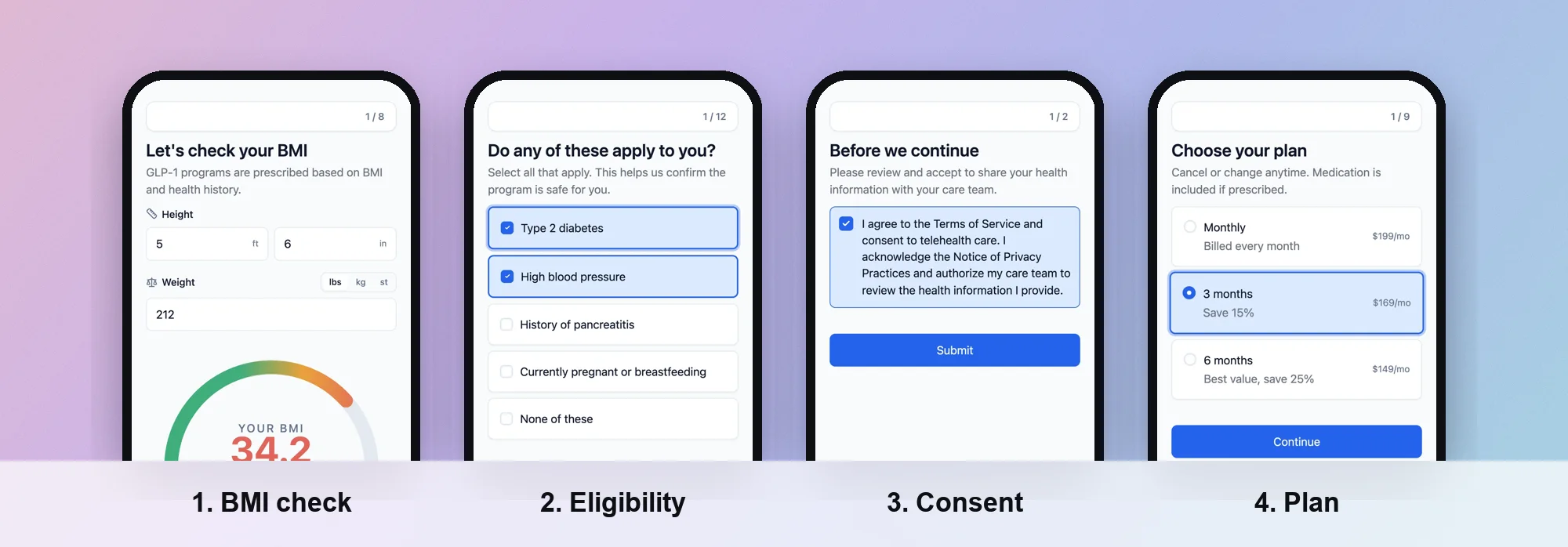 A flow built in PathwAI.
PathwAI is an AI-native patient acquisition platform: an AI agent builds the intake flow, eligibility quiz and checkout from a plain-English description, and your team reviews and approves it. Here is how the seven steps map to it:
- Draft the funnel from a description. Describe your program and the AI agent generates the steps, patient-facing copy and routing. Or start from the GLP-1 eligibility and intake template. The result is a draft: nothing publishes without your approval, and consent wording goes to your clinical or legal team.
- Arrange the steps on one canvas. In the visual builder, eligibility, intake, consent and checkout steps sit on one canvas, with fields such as yes/no, file upload, BMI calculators, medication lists and screening instruments.
- Route on answers. Routing rules branch on any answer or combination of answers. Eligible patients go on to intake and checkout; ineligible patients get a custom message, a waitlist or another treatment path. Your clinicians set the criteria.
- Make consent a step. Patients must acknowledge before continuing, and the consent is timestamped and stored with the intake data.
- Check out inside the flow. Take payment with Stripe or Authorize.Net, book with Cal.com, or verify ID with Persona as steps.
- Measure and test. Step-level analytics and A/B testing show completion and drop-off for every screen and let you test copy, step order or routing against a control.
- Track ads without PHI. The Data Platform sends conversions server-side to Meta, Google Ads, TikTok and Microsoft Ads. Email and phone are SHA-256 hashed, PHI such as date of birth and condition is stripped before any event leaves, and only visitors who consented are sent.
Flows run on your own domain or embedded on your website. A BAA is available on the Enterprise plan.
Checklist
- The flow’s first screen names the treatment the ad promised and gives an honest time estimate.
- The first question is about the patient’s goal.
- Hard eligibility questions come early, with criteria set by your clinicians.
- The medical intake has one question or tight group per screen, in phases.
- Each consent sits where it applies, with an active, timestamped acknowledgment.
- Checkout shows a recommendation and the full price before card details.
- The last screen says who reviews the answers and what happens next.
- You see drop-off for every screen and test one change at a time.
- Ad conversions go server-side, hashed, without health answers, and only with consent.
Frequently asked questions
What is a good conversion rate for a telehealth intake funnel?
There is no honest benchmark that transfers between brands: treatment, price, traffic source and how strict the eligibility criteria are all change it. Compare your funnel against itself. Measure completion per step, fix the biggest cliff, and track the result over time.
How long should a telehealth intake funnel be?
As long as your clinicians need, and no longer. The 13 public flows we rebuilt ran from 7 to 17 screens. Cut any question a clinician will not use, branch past what does not apply, and split long sections into phases.
Should eligibility questions come before or after contact details?
Put one easy goal question first, then the hard eligibility questions, so nobody fills in a long history before learning they are not a fit. Where contact capture goes is a trade-off worth testing; right after the goal questions is a common middle ground.
Can I use the Meta pixel on my intake funnel?
Be careful. The FTC and HHS have warned telehealth providers about tracking technologies such as the Meta pixel disclosing health information. A safer pattern is server-side conversions with hashed identifiers, no health answers, and only for visitors who consented. Ask your own counsel about your obligations.