
Best HIPAA-compliant form builders for healthcare (2026)
Nine form builders that sign a BAA, compared: which plan includes it, starting price, what each is best for, and when you need an intake funnel instead.
Written for operators at telehealth brands, clinics and health programs choosing a form tool for patient data
The best HIPAA-compliant form builder is the one that signs a Business Associate Agreement on the plan you can afford and sends answers only where you have a BAA. For telehealth and DTC health brands that turn ad traffic into patients, PathwAI is built for that job: intake, consent and checkout in one flow, with conversion tracking that keeps health data away from ad platforms. For simple forms on a budget, Jotform (Gold plan) and Cognito Forms (Enterprise plan) publish their prices. For product teams with engineers, Formsort is the most flexible.
Below are nine tools whose BAA we could confirm on the vendor’s own website, the plan it comes on, and what each is best for.
Quick picks
| Tool | Best for | BAA on which plan | Starting price |
|---|---|---|---|
| PathwAI | Telehealth and DTC brands running intake as a funnel | Enterprise | Quote |
| Jotform | Simple HIPAA forms, fast | Gold and Enterprise | $99/month billed annually (Gold) |
| Formsort | Product teams that want deep control | Enterprise | Quote |
| FormDr | Practices replacing paper and PDF packets | All plans | Quote |
| Typeform | Brand-led forms at large companies | Enterprise and Growth Custom | Quote |
| Formstack | Organizations already running workflows on Formstack | Healthcare plan (HIPAA add-on) | Quote |
| Cognito Forms | Small teams that want a published HIPAA price | Enterprise | $129/month billed annually |
| Zoho Forms | Teams already on Zoho | Premium | Published on Zoho’s site |
| IntakeQ | Solo and small practices | Forms Only and above | $54.90/month |
Starting price is for the cheapest plan that includes the BAA, as listed on each vendor’s site in October 2026. “Quote” means no public price for that plan.
What makes a form builder HIPAA-compliant?
No government body certifies software as “HIPAA compliant.” HIPAA applies to covered entities (providers, health plans, clearinghouses) and to the business associates that handle protected health information for them, and a form vendor that stores your patients’ answers is one. Check five things.
1. A signed BAA. HHS requires a covered entity to get “satisfactory assurances,” in a written contract, that a business associate will safeguard the information before disclosing PHI to it. See the HHS page on business associates. Most form builders sign one only on a higher plan.
2. Encryption. Answers should be encrypted in transit (TLS) and at rest. Some tools encrypt only the fields you mark as health data.
3. Access control. The HIPAA Security Rule’s technical safeguards include access control, audit controls, integrity, authentication and transmission security. HHS explains them in its Security Rule summary. For a form tool, that means named users, role-based permissions, and sessions that time out.
4. Audit logs. You should be able to see who viewed, exported or edited a submission, and when.
5. Where the data goes next. A form can be covered by a BAA while its integrations are not. If a submission flows to an email inbox, a spreadsheet, a CRM or an ad pixel without a BAA, the PHI leaves the protected path. The HHS guidance on online tracking technologies covers the tracking side of this, and notes that a cookie banner is not a HIPAA authorization.
If you are a DTC health brand that is not a HIPAA covered entity, you are not off the hook: the FTC’s Health Breach Notification Rule can apply to health apps and similar products that HIPAA does not cover. Our HIPAA-ready intake playbook walks through both cases.
How we picked
We checked each vendor’s own pricing and compliance pages in October 2026 for two facts: does it sign a BAA, and on which plan. We kept only tools where the vendor states it plainly.
Three tools we looked at did not make the list. Paperform says on its pricing page that it is not HIPAA compliant and does not sign BAAs today, with HIPAA support planned for the first half of 2027. Fillout’s security page lists SOC 2 Type 2, GDPR and FERPA but does not mention HIPAA. Feathery says it is HIPAA compliant, but we could not find a BAA or the plan it comes on in its public pages.
The 9 best HIPAA-compliant form builders
1. PathwAI
Best for: telehealth and direct-to-consumer health brands where the form is the funnel: GLP-1, HRT, dermatology, aesthetics, mental health and primary care programs.
PathwAI is an AI-native builder for patient intake flows, eligibility quizzes and checkout. Eligibility, intake, consent and payment sit on one visual canvas, with routing rules that branch on any answer, so eligible patients go on to intake and checkout while ineligible ones get a custom message, a waitlist or another path. Consent is its own step, timestamped and stored with the answers. Steps can take payment (Stripe, Authorize.Net), book with Cal.com and verify ID with Persona. Flows run on your own domain or embedded on your site.
Strengths: the built-in Data Platform sends conversions to Meta, Google, TikTok and Microsoft from the server, with email and phone SHA-256 hashed, health details stripped, and nothing sent for visitors who did not consent. There are no third-party ad pixels on the flow. Step-level analytics show where patients drop off, and A/B tests run without engineering.
Limitation: PathwAI is not an EHR and not a general form tool for internal paperwork. It is not SOC 2 certified at this time, and the BAA is on the Enterprise plan only.
Pricing: scoped to volume, integrations and compliance needs, usually starting with a short pilot. See pricing and the HIPAA page.
2. Jotform
Best for: small teams that need HIPAA forms live this week at a published price.
Jotform is a general-purpose form builder. Its HIPAA features are on the Gold and Enterprise plans, and Jotform says customers who enable HIPAA compliance receive a signed BAA. It lists encryption, audit-ready activity logs and secure e-signatures among those features.
Strengths: quick to learn, published pricing, and HIPAA-enabled templates and integrations on the eligible plans.
Limitation: Starter, Bronze and Silver plans list HIPAA features as not available, so the entry price for PHI is Gold. As with any form builder, eligibility routing, consent records and checkout across steps are yours to assemble. Our Jotform comparison goes deeper.
Pricing: Gold is $99 a month billed annually, or $129 month to month. Enterprise is custom.
3. Formsort
Best for: product and engineering teams at health companies that want detailed control over a multi-step flow.
Formsort is a no-code form and flow builder. It says it is HIPAA compliant and will sign a BAA with Enterprise clients, and that it is SOC 2 Type II certified.
Strengths: fine control over flow logic and data delivery. Formsort says data is encrypted at rest and in transit and held for only three weeks pending delivery to your integrations.
Limitation: HIPAA is not on the Free or Pro plans, and Formsort notes that you are responsible for what data goes to third-party integrations. It tends to pay off most with technical help on hand.
Pricing: Free (100 flow starts a month) and Pro ($279 a month, 1,000 flow starts) are published; Enterprise, where HIPAA sits, is by quote.
4. FormDr
Best for: single and multi-location practices moving off paper forms, PDFs and fax.
FormDr (FormDoctor) is patient intake software for practices. It covers a no-code form builder, form packets, PDF-to-form conversion, insurance and ID card photo upload, e-signatures, two-way texting, reminders and EHR sync. Its site says a BAA is included with the service, and its pricing page lists “HIPAA Compliant with BAA” across plans, with a custom BAA available on Enterprise.
Strengths: BAA on every plan, and practice workflow (packets, texting, reminders) built around the visit.
Limitation: it is built for practices with scheduled patients, not for acquiring patients online, so there is no ad attribution or checkout funnel.
Pricing: three tiers (Core, Growth, Enterprise), all by quote.
5. Typeform
Best for: larger organizations that already use Typeform for its one-question-at-a-time forms and want to keep it for health data.
Typeform’s pricing page marks HIPAA as Enterprise only, and its help center says a BAA is available to customers on Enterprise or Growth Custom plans, requested through sales.
Strengths: a polished respondent experience and a familiar editor for marketing teams.
Limitation: the BAA is out of reach on the self-serve plans (Basic through Growth Flow), so most small health brands start on a plan that cannot hold PHI.
Pricing: Enterprise and Growth Custom are by quote.
6. Formstack
Best for: organizations that already run approvals, documents and e-signatures on Formstack.
Formstack offers a Standard BAA and evaluates custom BAA requests. HIPAA is an add-on rather than part of the standard Forms plan, delivered as a healthcare account with data encryption, field and folder security, user-level permissions and audit logging. Its help center points healthcare customers collecting ePHI to the Formstack for Healthcare plan.
Strengths: forms, documents and e-signatures under one vendor, with a standard BAA.
Limitation: the HIPAA add-on price is not published, and the healthcare plan is a separate account type, so check which integrations it supports before you build.
Pricing: the Forms plan is $83 a month billed annually; HIPAA is an add-on by quote.
7. Cognito Forms
Best for: small teams that want a published monthly price for HIPAA forms.
Cognito Forms offers HIPAA compliance to Enterprise organizations through a BAA. The organization must be on Enterprise (not a trial), the BAA is signed inside the account by an Owner, and Cognito says there is no extra cost beyond the subscription.
Strengths: clear terms. HIPAA accounts get encryption at rest and a one-hour session timeout instead of eight hours.
Limitation: support for HIPAA accounts works by email rather than direct access to your forms, and entry data cannot be copied when you move forms into a HIPAA organization.
Pricing: Enterprise is $129 a month billed annually, or $174 month to month.
8. Zoho Forms
Best for: teams that already run CRM or operations on Zoho.
Zoho Forms lists HIPAA compliance and ePHI on its Premium plan only. You request Zoho’s BAA template from its legal team, and Zoho says not to enable HIPAA or collect PHI until the BAA is signed by both parties. You then mark individual fields as ePHI.
Strengths: Zoho says ePHI fields are encrypted at rest with AES-256, data in transit uses TLS 1.2 or higher, and the audit trail records every view, edit, export and deletion of a submission.
Limitation: encryption applies to the fields you mark, so a missed field is a gap. The BAA is a separate step with Zoho’s legal team rather than a switch in the account.
Pricing: published on Zoho’s site; HIPAA requires the Premium plan.
9. IntakeQ
Best for: solo practitioners and small cash-pay or wellness practices.
IntakeQ combines online intake forms with practice management on its higher plan. Its pricing page lists a HIPAA BAA on Forms Only, and Practice Management includes all Forms Only features.
Limitation: the low-volume plans do not list the BAA, so check before collecting PHI. It is built for an existing patient list, not for acquiring patients from ads.
Pricing: Forms Only is $54.90 a month; Practice Management is $84.90 a month.
Form builder vs intake funnel builder
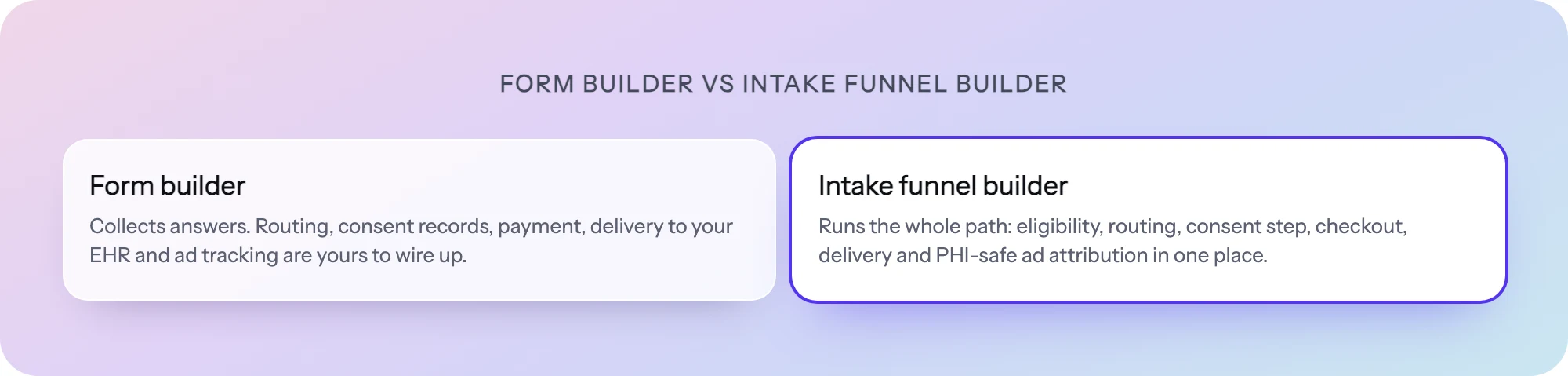
A HIPAA-compliant form builder answers one question: can I collect health data safely? For many clinics that is enough: a patient gets a link, fills in a packet, and the answers go to the chart.
Telehealth and DTC health brands start patients from an ad, and the intake is how a visitor becomes a paying patient. That needs more than a secure form:
| Need | Form builder | Intake funnel builder |
|---|---|---|
| Route by eligibility to different endings | Basic conditional logic | Routing on any answer or combination, on a canvas |
| Consent as a recorded step | Usually a checkbox or e-signature | A required, timestamped step stored with the answers |
| Payment and booking inside the flow | Sometimes, as a field | As steps, before or after eligibility |
| Drop-off by step | Rarely | Built in |
| Ad conversions without exposing PHI | Not part of the product | Server-side, hashed and consent-gated |
The last row is the one teams discover late. An ad pixel on a form page risks sending health data to an ad platform with no BAA; dropping tracking means you cannot tell which ads bring patients. Server-side, consent-gated tracking avoids both. We compare three common form tools for this use in Typeform vs Jotform vs Formsort for healthcare, and the wider intake market in our best patient intake software guide.
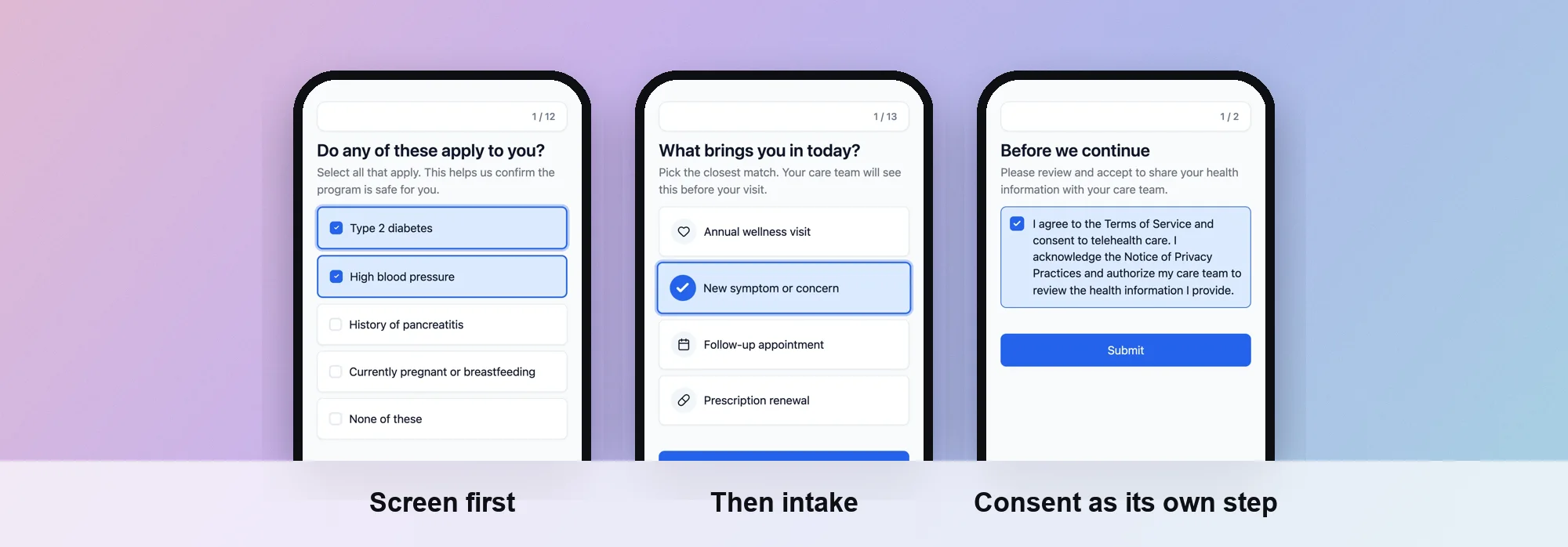 Eligibility, intake and a consent step, built in PathwAI.
How to build HIPAA-ready intake in PathwAI
- Draft the flow. Describe the program in plain English and the AI agent generates a draft with steps, patient-facing copy and routing. No patient data goes into the prompt. Or start from the GLP-1 eligibility and intake template.
- Set the routing with your clinicians. On the canvas, add the eligibility rules your clinical team defines, such as a BMI calculator step and contraindication questions, and send people who do not qualify to their own ending or a waitlist.
- Add consent as a step. Paste the consent wording your clinical or legal team approved. Patients must acknowledge it to continue, and the record is timestamped and stored with the intake.
- Add checkout and booking. Take payment with Stripe or Authorize.Net, and book a consult with Cal.com, inside the same flow.
- Connect conversion tracking without pixels. Turn on the Data Platform so completed intakes and purchases go server-side to Meta, Google, TikTok and Microsoft as hashed identifiers, only for visitors who consented.
- Review, then publish. Share a preview link with the team, sign the BAA on Enterprise, and publish to your own domain or embed. Then watch drop-off by step in analytics.
Checklist before you collect PHI
- The BAA is signed, on the plan you are actually paying for, not a trial.
- Every place answers go next (email alerts, CRM, EHR, spreadsheets, webhooks) is covered by its own BAA or receives no PHI.
- No third-party ad pixel or analytics tag runs on pages where patients enter health information.
- Encryption covers every sensitive field, not only the ones someone remembered to mark.
- Each team member has a named login with least access, and you can pull an audit log.
- Consent is recorded with a timestamp and stored with the answers.
- Eligibility criteria come from your clinicians.
- You have completed the form yourself on a phone.
Frequently asked questions
Is Jotform HIPAA compliant?
Jotform offers HIPAA features on its Gold and Enterprise plans, and says customers who enable HIPAA compliance receive a signed BAA. Its Starter, Bronze and Silver plans list HIPAA features as not available.
Is Typeform HIPAA compliant?
Typeform marks HIPAA as Enterprise only on its pricing page, and its help center says a BAA is available on Enterprise or Growth Custom plans. Its self-serve plans do not include one.
What is the cheapest HIPAA-compliant form builder?
Among the tools we verified, IntakeQ’s Forms Only plan ($54.90 a month), Jotform Gold ($99 a month billed annually) and Cognito Forms Enterprise ($129 a month billed annually) have the lowest published prices for a plan that includes a BAA, as of October 2026.
Do I need a BAA if my brand is not a HIPAA covered entity?
HIPAA’s BAA requirement applies to covered entities and their business associates. Many cash-pay DTC brands work with covered providers, so check with counsel which side you are on. Even outside HIPAA, the FTC’s Health Breach Notification Rule can apply to health data you collect.
PathwAI publishes this guide and is one of the tools listed. Details for other vendors come from their own websites as of October 2026 and can change; confirm them with each vendor before you sign.