
HIPAA-ready patient intake: a practical playbook
How to build a patient intake flow that collects only what care needs, places consent where it is read, keeps PHI out of ad tools and still converts.
Written for operations and growth leads building intake for a regulated health program
A HIPAA-ready intake flow asks only for the information care actually needs, gets consent at the moment it is read, sends that data only to vendors that have signed a Business Associate Agreement, and never lets health answers leak into ad or analytics tools. Done well, it also converts better, because a short, guided flow is easier to finish than a long form. This playbook walks through the seven decisions that get you there.
What is a HIPAA-ready intake flow?
A HIPAA-ready intake flow is the set of screens a patient completes before care (eligibility questions, medical history, consent and often payment) designed so that the data it collects is handled the way the HIPAA Privacy and Security Rules expect. That means three things in practice: the flow collects the minimum necessary, every system that receives the answers is covered by a Business Associate Agreement, and no protected health information (PHI) reaches a vendor that is not allowed to have it.
“HIPAA-ready” describes how the flow is built and run. There is no official HIPAA certification for software, so treat any vendor that claims one with care.
Who this applies to
HIPAA applies to covered entities (health plans, clearinghouses and providers who bill electronically) and to their business associates, the vendors that handle PHI on their behalf. If you run a telehealth practice that bills insurance, you are almost certainly a covered entity, and your intake vendor is a business associate.
Cash-pay and direct-to-consumer health brands are not always covered by HIPAA, but that does not make health data unregulated:
- The FTC’s Health Breach Notification Rule, updated in 2024, covers health apps and similar services outside HIPAA, and treats sharing health information without the person’s authorization as a breach.
- State laws such as Washington’s My Health My Data Act require consent before collecting or sharing consumer health data.
Building to the HIPAA standard is the simplest way to stay on the right side of all three. Your counsel decides which rules apply to your program.
The playbook: seven decisions
1. Give every field a reason
Write down why each question exists: does a clinician need it to decide eligibility or treatment, or does billing need it? Anything without a reason comes out. This is the HIPAA minimum necessary standard applied to a form, and it is also the single biggest lever on completion: every question you remove is one fewer place for a patient to stop.
2. Screen first, collect details later
Put the few high-signal eligibility questions first (age, location, the condition or goal, the hard contraindications your clinicians set) and route people who do not qualify to a clear ending before they type their medical history. People who qualify then see the longer intake, a few questions per screen, with follow-ups that only appear when an earlier answer calls for them. You collect less PHI from people you cannot treat, and the people you can treat are not asked about things that do not apply to them.
3. Place consent where it is read
Consent buried in a footer link is not read. Give it its own step, at the point where the patient is about to share sensitive information or submit, with the full text visible and an explicit checkbox or signature. Record when it was given, alongside the intake answers.
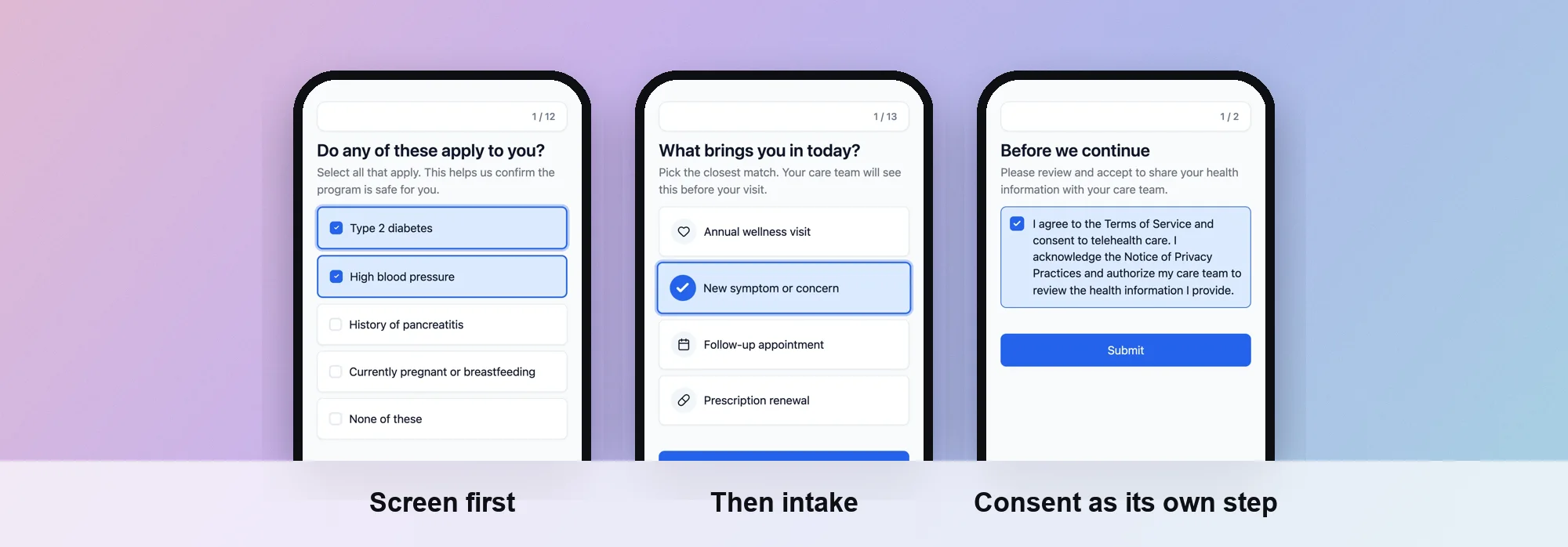 Screen first, then intake, then consent as its own step. Screens from a PathwAI flow.
Keep two kinds of consent apart. Consent to treatment and telehealth is one thing; permission to use someone’s information for marketing is another, and under HIPAA it needs its own written authorization. A cookie banner is neither.
4. Keep PHI out of ad and analytics tools
This is where most health brands get into trouble. The HHS Office for Civil Rights bulletin on online tracking technologies explains that a tracking pixel on a page where patients enter health information can disclose PHI to the ad platform, and that a cookie banner does not count as a HIPAA authorization. A federal court narrowed part of that guidance in June 2024, the part about visits to public pages that do not require a login, but the core point stands for intake: a pixel on the screen where someone ticks “type 2 diabetes” is sending health data to an advertiser.
The safe pattern:
- No third-party ad pixels on intake steps.
- Conversions sent to ad platforms from your server, not the browser, so you control exactly what leaves.
- Identifiers such as email and phone hashed before they are sent, and health answers never sent at all.
- Nothing sent for a visitor who has not given consent.
You still get to measure campaigns. You just stop handing advertisers your patients’ answers.
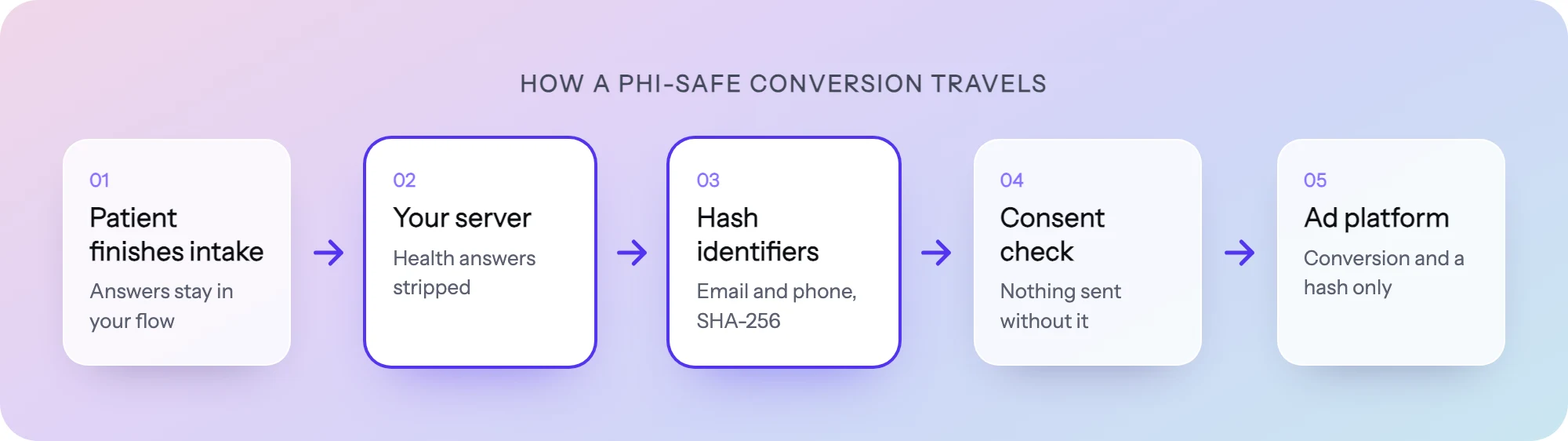 A PHI-safe conversion: the ad platform gets the conversion and a hashed identifier, never the answers.
5. Sign a BAA with every vendor that touches PHI
List every system the answers pass through: the intake tool, the EHR, the CRM, email and SMS tools, data warehouses, support desks. Each one that creates, receives, stores or transmits PHI for you is a business associate and needs a signed BAA before it sees real patient data. Check the plan tier: many vendors only sign a BAA on their enterprise plan. Payment processors are a special case, because a narrow HIPAA exception covers processing payments; ask your counsel how it applies to yours.
6. Route answers to where care happens
Intake data should land in the system your clinicians and care team work in, structured, not as a PDF in someone’s inbox or a CSV export on a laptop. Send each submission to your EHR or care queue through an integration or a signed webhook, with field names your team recognizes. Fewer copies means fewer places PHI can leak.
7. Measure every step, not just the total
An overall completion rate tells you that people leave, not where. Track for each step how many people reached it and how many left there, how long the flow takes, and how many people end up eligible versus not. If one eligibility question disqualifies far more people than your clinicians expected, that is a calibration problem, not a marketing one. Then change one step at a time and compare it against the current version.
Common intake mistakes and the HIPAA-ready alternative
| Common mistake | HIPAA-ready alternative |
|---|---|
| One long form with every question on one page | Eligibility first, then a few questions per step |
| Asking for history before checking eligibility | Screen out people you cannot treat before they share PHI |
| Consent in a footer link | A dedicated consent step, recorded with the answers |
| Meta or Google pixel on intake pages | Server-side conversions with hashed identifiers, consent-gated |
| Submissions emailed or exported to a spreadsheet | Structured delivery to the EHR or care queue |
| A single overall completion rate | Completion and drop-off for every step |
How to build it in PathwAI
PathwAI is an AI-native builder for patient intake flows, with a built-in data platform for ad tracking. The playbook above maps onto it directly:
- Visual canvas and routing rules. Build eligibility, intake, consent and checkout as steps on one canvas, and branch on any answer or combination of answers. People who do not qualify get their own ending, a waitlist or another treatment path.
- Consent as a step. Patients acknowledge before continuing, and the consent is timestamped and stored with their intake answers.
- Server-side conversions. PathwAI’s Data Platform sends conversions to Meta, Google, TikTok and Microsoft from the server, hashes identifiers such as email and phone, strips health answers, and sends nothing for visitors who did not consent. It does not need a third-party ad pixel on the flow.
- Delivery to your systems. Submissions go to your EHR, CRM or care queue through integrations and signed webhooks.
- Step-level analytics and A/B tests. See where patients stop, change the step, and test it against the current version without an engineer.
- AI drafts without patient data. Describe your program and PathwAI’s AI drafts the flow for your team to review. No patient data goes into the prompt, and nothing publishes without your approval.
PathwAI signs a BAA on its Enterprise plan. It is not SOC 2 certified at this time. The HIPAA page covers how data is handled, and the GLP-1 eligibility and intake template is a working example of the structure above.
A pre-launch checklist
- Every field has a written reason, and anything without one is gone.
- Eligibility questions come first, with a clear ending for people who do not qualify.
- Consent has its own step, the full text is visible, and it is recorded.
- No ad or analytics pixel runs on any intake step.
- Every vendor that receives answers has a signed BAA at your plan tier.
- Submissions land in the EHR or care queue, not in inboxes.
- You can see completion and drop-off for every step.
- Your clinicians have approved every eligibility rule, and your counsel has approved the consent text.
Frequently asked questions
Is there such a thing as a HIPAA-certified form builder?
No. HIPAA has no official certification for software. What matters is whether the vendor will sign a BAA, how it protects data (encryption, access controls, audit trails) and how you configure and use it.
Can I use Meta or Google ads for a telehealth program?
Yes, but not with their browser pixels on pages where patients enter health information. Send conversions from your server through the platforms’ conversion APIs, hash identifiers, never send health answers, and only send for visitors who consented.
Do cash-pay telehealth brands need to worry about this?
Often yes, even when HIPAA itself does not apply. The FTC’s Health Breach Notification Rule and state laws such as Washington’s My Health My Data Act cover health data outside HIPAA. Building to the HIPAA standard covers most of what they ask.
Does a cookie banner count as consent?
Not for HIPAA purposes. The HHS bulletin says a cookie banner is not a valid HIPAA authorization. Marketing use of PHI needs a specific written authorization.
This guide is general information, not legal advice. Your counsel and compliance team decide what applies to your program.