
Best Typeform alternatives for HIPAA-compliant patient intake (2026)
Eight Typeform alternatives for HIPAA patient intake, compared on which plan carries HIPAA or a BAA, published price, fit and a fair limitation for each.
Written for operators, growth leads and practice managers at telehealth brands, DTC health brands and clinics
Typeform lists HIPAA on its Enterprise plan only, so a health team on Basic, Plus or Business cannot use it to collect patient health information. The best alternative depends on the job. If intake is how you turn ad traffic into patients (eligibility, consent, checkout and attribution), PathwAI is built for that. If you want HIPAA forms at a published price, Jotform Gold, Cognito Forms Enterprise or IntakeQ cost less. If you only need a polished survey with no health questions, Typeform’s self-serve plans are still fine.
Below are eight alternatives, what each vendor says on its own site about HIPAA and pricing, a fair limitation for each, and a checklist for switching.
Quick picks
| Tool | Best for | HIPAA or BAA, per the vendor | Published starting price for HIPAA |
|---|---|---|---|
| PathwAI | Telehealth and DTC health brands running intake as an acquisition funnel | BAA on Enterprise | Quote (usually starts with a pilot) |
| Jotform | Simple HIPAA forms, quickly | HIPAA features and a signed BAA on Gold and Enterprise | $129/month, or $99/month billed annually (Gold) |
| Formsort | Product teams with engineers building long, branching flows | HIPAA and BAA on Enterprise | Quote (Enterprise) |
| FormDr | Practices replacing paper intake packets | ”HIPAA Compliant with BAA” on its Complete plan | Quote |
| Cognito Forms | Teams that want general forms with a BAA on a self-serve plan | HIPAA through a BAA on Enterprise | Listed on its pricing page (Enterprise) |
| Zoho Forms | Teams already on Zoho apps | HIPAA compliance on Premium; BAA template on request | Not listed on the pricing page we read |
| IntakeQ | Solo and small practices | ”HIPAA BAA” listed on Forms Only plans | $29.90/month (low volume) or $54.90/month |
| Feathery | Logic-heavy forms in regulated industries | Says it is HIPAA compliant; no BAA mentioned on the pages we read | Free plan; paid plans on quote |
Prices and plan details come from each vendor’s own website, checked in October 2026. They change often, so confirm before you sign.
What does Typeform offer for HIPAA?
Typeform’s pricing page lists six plans: Basic ($39 a month, or $28 billed annually, 100 responses), Plus ($79, or $56 annually, 1,000 responses), Business ($129, or $91 annually, 10,000 responses), Talent, Growth Flow and Enterprise. HIPAA appears only on Enterprise, which the page describes as including “SSO, HIPAA, GDPR compliance, and your choice of US or EU data center.” The HIPAA feature entry is marked “Enterprise only.” Enterprise is priced by quote.
So the real question for a health team is not “Is Typeform HIPAA compliant?” but “Do we want to buy Typeform Enterprise to get a BAA?” For some large companies that already use Typeform across marketing and HR, the answer is yes. For most clinics, telehealth startups and DTC health brands, the low self-serve price no longer applies once health data is involved, and that is when they look elsewhere. Our page on PathwAI vs Typeform covers the two products side by side.
What makes a form builder HIPAA-ready for intake?
A tool is usable for patient intake when the vendor will sign a business associate agreement (BAA) with you, on the plan you actually pay for, and the product keeps health data out of places it should not go. A marketing page that says “HIPAA compliant” is not enough on its own. Before you shortlist, check:
- A BAA, and on which plan. Most vendors gate it to a top tier. Price that tier, not the entry plan.
- Where answers go next. Every destination (EHR, CRM, email tool, spreadsheet, webhook) either signs a BAA too or receives no health data.
- No ad pixels on intake pages. A third-party pixel on a page where patients answer health questions can send that context to an ad platform. Our HIPAA intake playbook explains why.
- Consent you can prove. A consent step patients must acknowledge, with a stored record of when.
- Fit for the flow. Branching on eligibility, payment inside the flow, and reporting on where patients drop off matter more for acquisition than for an intake packet sent before a visit.
For a wider list that is not framed around Typeform, see the best HIPAA-compliant form builders.
How we compared
We read each vendor’s own pricing, security and compliance pages in October 2026 and recorded which plan carries HIPAA or a BAA, the published price where there is one, the audience the vendor names, and how far the tool goes beyond the form. When a page did not say something, we say that rather than guess. We do not link to vendor sites; search for each by name.
PathwAI
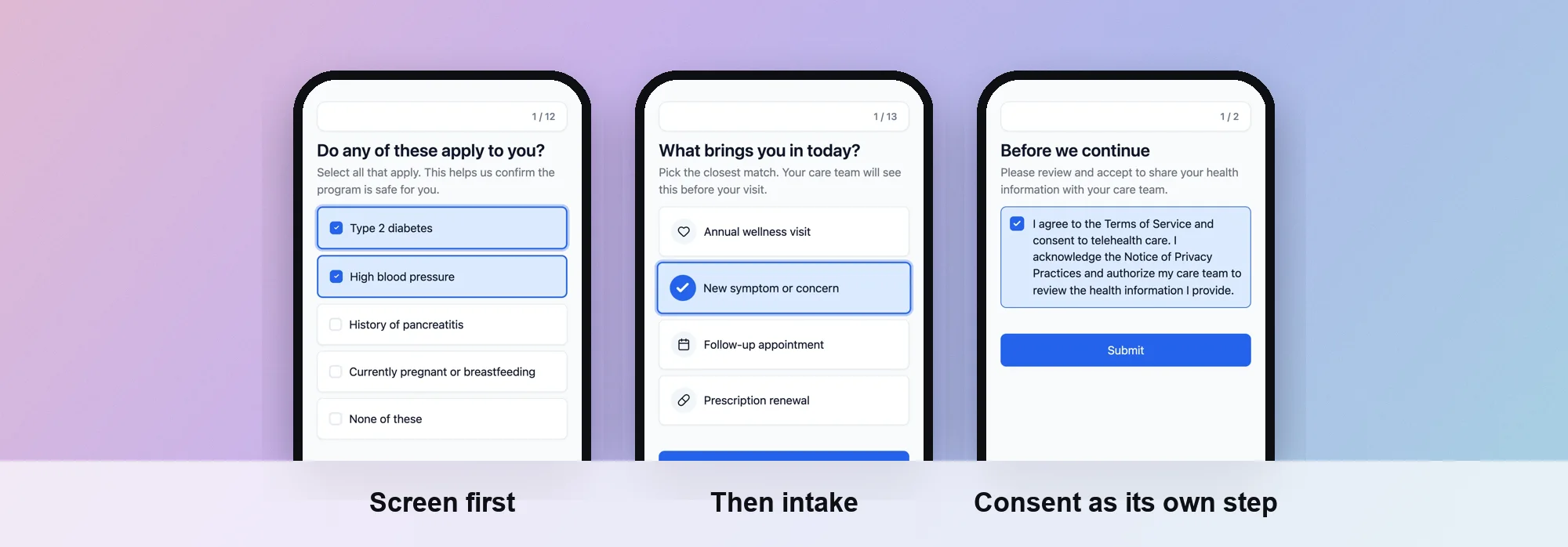
Best for: telehealth and DTC health brands that turn ad traffic into patients.
PathwAI is an AI-native patient acquisition platform. An AI agent builds the intake flow, eligibility quiz or checkout funnel from a plain-English description, and your team reviews and approves the draft before anything publishes. No patient data is used in generation prompts. See how the AI agent drafts a flow.
What it covers:
- The whole funnel on one canvas. Eligibility, intake, consent and checkout steps sit together in the visual builder. Routing rules branch on any answer or combination of answers: eligible patients continue to intake and checkout, ineligible patients get a custom message, a waitlist or another treatment path. Your clinicians set the eligibility criteria.
- Field types for health. Multiple choice, yes/no, numeric, free text, date, file upload, BMI calculators, medication lists, screening instruments and custom widgets.
- Consent as a step. Patients must acknowledge before continuing, and consent is timestamped and stored with the intake data.
- More than answers. Steps can take payments (Stripe, Authorize.Net), book appointments (Cal.com), verify ID (Persona) and analyze a photo with AI Scan.
- Ad attribution without pixels. The built-in Data Platform sends conversions server-side to Meta, Google Ads, TikTok and Microsoft Ads. Email and phone are SHA-256 hashed, PHI such as date of birth and condition is stripped, and events go only for visitors who consented. No third-party ad pixels.
- Step-level analytics. Completion and drop-off for every screen, plus A/B tests of copy, step order or routing. More on analytics and A/B testing.
- Compliance. BAA on the Enterprise plan. Encryption in transit and at rest. Not SOC 2 certified at this time. Details on our HIPAA page.
Limitation: no public list price; pricing is scoped to volume, integrations and compliance needs, and usually starts with a short pilot. It is built for health acquisition funnels, so a team that wants one form tool for every department will find it narrower than a general form builder. It is not an EHR.
Jotform
Best for: clinics and small teams that want HIPAA forms quickly at a published price.
Jotform’s HIPAA page says Gold and Enterprise plans give access to HIPAA-enabled templates, integrations and plug-ins, and that covered entities who turn on HIPAA compliance features in their account “will also receive a signed Business Associate Agreement (BAA).” Its pricing page lists Gold at $129 a month, or $99 a month billed annually. Starter, Bronze and Silver do not include HIPAA.
Limitation: Jotform is a form builder first. Long branching flows, a checkout designed as part of a treatment funnel and server-side ad conversions are outside its core. It suits an intake packet better than a paid acquisition funnel you test week to week.
Formsort
Best for: product teams with engineering support building long, branching flows.
Formsort’s pricing page lists Free ($0, 100 flow starts a month), Pro ($279 a month, 1,000 flow starts, $239 for each additional 1,000) and Enterprise on quote. HIPAA compliance is listed under Enterprise only, and the page says Formsort “will sign a BAA with enterprise clients.”
Limitation: like Typeform, the BAA means Enterprise, so the published Pro price does not apply to PHI. Pricing by flow start grows with ad traffic, including visitors who leave on the first screen. Payment and ad attribution usually live in other tools. More in our list of Formsort alternatives.
FormDr
Best for: practices replacing paper and PDF intake packets.
FormDr prices by quote; its pricing page says pricing “is tailored to your practice size, volume, and intake needs.” It lists a Complete plan marked “HIPAA Compliant with BAA” and an Enterprise plan with “Custom BAA & SLA available.” It names its audiences: single-location practices and solo practitioners (Core), group practices (Growth), and health systems, provider networks and community health organizations (Enterprise).
Limitation: FormDr is built for practices with existing patients and appointments. It is not designed for DTC brands acquiring patients from ads, so eligibility-driven checkout and ad conversion reporting are not its focus. No published price.
Cognito Forms
Best for: teams that want a general form builder with a BAA on a self-serve plan.
Cognito Forms says it “offers HIPAA compliance to Enterprise level organizations through business associate agreements.” Its pricing page lists HIPAA compliance on the Enterprise plan, with a published monthly price. When we checked, the page showed two different price layouts, so read the current figure there before you budget.
Limitation: HIPAA is on the top plan only. Cognito Forms is a general business form tool, so treat it as an intake form, not an acquisition funnel: there is no built-in eligibility-to-checkout flow or server-side ad reporting of the kind a telehealth brand needs.
Zoho Forms
Best for: teams that already run on Zoho apps.
Zoho Forms’ pricing page lists HIPAA compliance only on its Premium plan (100 users, 150,000 submissions a month); the other four plans show a dash. Its HIPAA page says you can request Zoho’s BAA template by email. The pricing page we read did not show prices.
Limitation: the BAA process is a request to Zoho’s legal team rather than a switch in the account, so allow time. Like the other general form tools, it covers the form, not the funnel around it.
IntakeQ
Best for: solo and small practices that want intake forms, and possibly practice management, at a low monthly price.
IntakeQ’s pricing page lists Forms Only at $54.90 a month ($20 per additional practitioner) and Practice Management at $84.90 a month ($30 per additional practitioner). Low-volume versions cost $29.90 a month (Forms Only, 10 form submissions a month) and $59.90 a month (Practice Management). Forms Only lists a “HIPAA BAA,” and Practice Management includes all Forms Only features.
Limitation: IntakeQ is priced and built per practitioner, for practices that see their own clients. A telehealth brand sending thousands of anonymous visitors through an eligibility quiz before any clinician is involved will find it the wrong shape. Our guide to patient intake software covers more tools in this group.
Feathery
Best for: teams that need complex, logic-heavy forms and care where data is hosted.
Feathery’s security page says “Feathery is HIPAA compliant,” that it is audited as SOC 2 compliant with a report available on request, and that it can host form data in regions including the US, EU, Canada and Australia. Its pricing page lists a Free plan, with Growth and Business on custom pricing.
Limitation: Feathery now describes itself as “the AI operating and decisioning system for financial services teams,” and its industry pages are wealth management and insurance. The pages we read did not mention a BAA, so ask for one, and the plan it covers, before you collect PHI.
When to stay on Typeform
Switching has a cost. Stay if:
- You already hold Typeform Enterprise with HIPAA, and the contract fits your volume.
- Your forms ask no health questions. A waitlist, newsletter sign-up or brand survey does not need a BAA.
- The rest of your stack is solved. If eligibility, payment, consent records and attribution are handled well elsewhere, a form is all you need.
Look harder at an alternative if you would be buying Enterprise only for the BAA, if routine flow changes wait on engineers, or if you cannot see which campaign produced which approved patient.
How to move a Typeform intake to PathwAI
Here is how a move typically runs.
- Describe the program. Write down the treatment, who it is for, the eligibility questions your clinicians set and what ineligible patients should see. Paste that into the AI agent, which drafts the steps, patient-facing copy and routing.
- Check the routing on the canvas. Open the draft in the builder and compare each branch with your Typeform logic. Rules can combine answers, for example a BMI result together with a medication question.
- Add consent and checkout. Add a consent step (your clinical or legal team reviews the wording) and a payment step with Stripe or Authorize.Net. Add Cal.com booking or Persona ID checks if the program needs them.
- Connect where data goes. Send intakes to your EHR, CRM or a webhook through the integrations, and turn on the Data Platform so conversions reach your ad platforms server-side, hashed and consent-gated.
- Review with the team. Share a preview link with clinical, legal and growth reviewers. Nothing publishes without explicit approval.
- Publish on your domain. Run the flow on your own domain or embed it on your site, then watch step-level drop-off.
Most teams ship a working first draft within a day or two of their demo call. To see your own flow rebuilt, get in touch or start from the GLP-1 eligibility and intake template.
Checklist before you switch
- Get the new vendor’s BAA in writing, on the plan you will pay for.
- Price the plan that carries the BAA, not the entry plan.
- List every place your current form sends answers and confirm each has a BAA or receives no PHI.
- Export your questions, logic and consent wording, and have clinicians re-approve eligibility criteria.
- Remove third-party ad pixels from pages where patients enter health information.
- Run the old and new flow side by side and compare drop-off before moving all traffic.
- Complete the new flow yourself on a phone, including payment.
Frequently asked questions
Is Typeform HIPAA compliant?
Typeform’s pricing page lists HIPAA on the Enterprise plan only. Basic, Plus, Business and its other self-serve plans do not include it, so do not collect health information on them.
What is the cheapest Typeform alternative with a BAA?
Among the tools we checked, IntakeQ’s low-volume Forms Only plan ($29.90 a month) and Jotform Gold ($99 a month billed annually) have the lowest published prices for a plan with a BAA, as of October 2026. Both are form tools rather than acquisition funnels.
Does Jotform sign a BAA?
Yes. Jotform’s HIPAA page says covered entities on a plan with HIPAA features (Gold or Enterprise) who turn those features on receive a signed BAA.
Is a BAA enough to make my intake HIPAA compliant?
No. A BAA covers one vendor. You also need every tool that receives the answers to be covered, no ad pixels on intake pages, and your own policies. Have your compliance or legal team review the whole flow.
Can I rebuild a Typeform intake without engineers?
In PathwAI, an AI agent drafts the flow from a plain-English description and your team edits routing, consent and checkout on a visual canvas. You may still want help connecting downstream systems such as your EHR, and clinicians should re-approve eligibility criteria.
PathwAI publishes this guide and is one of the tools listed. Details for other vendors come from their own websites as of October 2026 and can change; confirm them with each vendor before you sign.