
How to build an aesthetics lead quiz for Botox and filler consults
A step-by-step guide to an aesthetics lead quiz: intent and goals, fit screening your clinicians define, budget and timing, routing to booking or follow-up.
Written for owners, marketing leads and front desk managers at med spas and aesthetics practices running paid and social campaigns
An aesthetics lead qualification quiz is a short, phone-first flow that asks a prospective patient what they want to change, checks a few fit questions your clinicians chose, asks about timing and budget, and then sends ready people straight to a booking calendar and everyone else to a follow-up path. Built well, it takes about a minute, replaces the “name and phone number” form, and hands the front desk a lead that already says what the person wants and when.
This guide walks through the step structure, which fit questions belong in a quiz (and which belong in the consult), how to route, how to handle photos, and what to keep out of the copy. It ends with how to build one in PathwAI.
What is an aesthetics lead qualification quiz?
It is a lead form that does sorting work. A standard contact form collects a name, an email and a phone number, and every lead looks the same until someone calls. A qualification quiz adds a handful of questions before the contact step, so each lead arrives with:
- Intent: which treatment or concern brought them in (forehead lines, lip volume, under-eye hollows).
- Goal: what result they hope for, in their own words or from a short list.
- Fit signals: answers to the questions your clinical team wants flagged before booking.
- Timing and budget: when they want to be treated and what they expect to spend.
- A next step: a booked consult, or a clear follow-up promise.
It is not a medical assessment. It does not decide who can be treated. A licensed provider still assesses every patient at the consult. The quiz sorts leads by rules your team writes, and those rules should come from your medical director, not from marketing.
Why a quiz beats a contact form for injectables
Most aesthetics traffic comes from ads and social posts, and most of it is early. Someone sees a lip filler reel, taps through, and is curious. Someone else has a wedding in five weeks and wants Botox booked this week. A contact form treats them the same, and the front desk spends its day calling both.
A quiz separates them in the session itself:
| Lead type | What the quiz learns | Where it routes |
|---|---|---|
| Ready to book | Clear treatment interest, timing within weeks, no flagged answers | Booking calendar, same session |
| Interested, not ready | Treatment interest, timing “just researching” | Follow-up ending, nurture email list |
| Needs a conversation first | A flagged fit answer (for example pregnancy, or a past reaction) | “We’ll call you” ending, team notified |
| Event-driven | A date close enough that it may affect planning | Booking, with the date shown to staff |
| Price-sensitive | Budget below your typical range | Follow-up path with pricing info or a consult offer |
The point is not to turn people away. It is to give each person the right next step and give staff the context before they pick up the phone.
The step structure
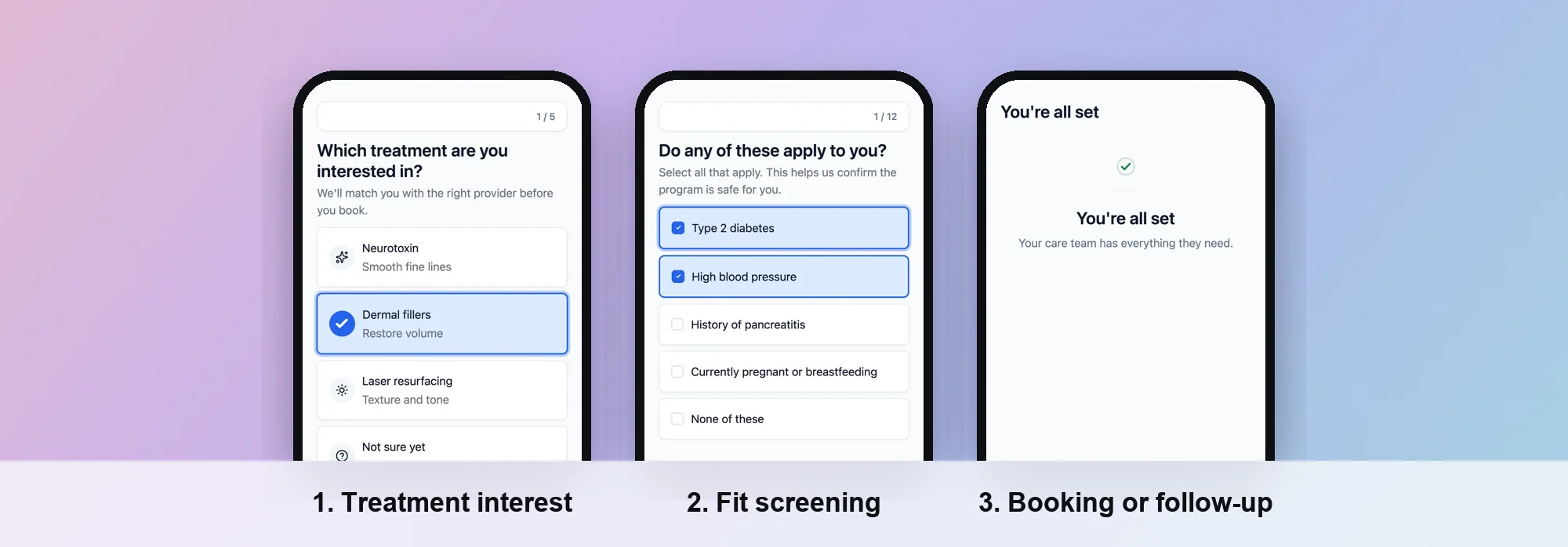 Screens from a PathwAI flow.
A good aesthetics quiz has five parts. Keep each to one question per screen where you can; people answer on phones, often from an Instagram in-app browser.
1. Treatment interest
Open with the easiest question: what are you interested in? Use picture cards or large buttons.
- Wrinkle relaxers (Botox and similar)
- Dermal filler (lips, cheeks, chin, under-eyes)
- Not sure, I want advice
The “not sure” option matters. People often know the concern, not the treatment. Route them to a concern question instead.
2. Concern area and goal
Ask which area they want to address, then what they hope for. Keep options concrete: “softer forehead lines”, “more lip volume”, “look less tired”. Avoid promising outcomes in the option text. “Look 10 years younger” is a claim; “look less tired” is the patient’s own goal.
3. Fit screening
This is the section your clinicians own. The goal is to flag answers that mean “talk first” rather than “book now”. Typical candidates, which your medical director should review and adjust:
- Pregnancy or breastfeeding. The Botox Cosmetic Medication Guide says it is not known if the product can harm an unborn baby or passes into breast milk, and asks patients to tell their doctor. The FDA’s dermal filler page says the safety of fillers is unknown during pregnancy.
- Past reactions and allergies. The FDA’s filler page lists conditions to tell a provider about before treatment, including severe allergies or a history of anaphylaxis, allergy to lidocaine, and allergy to some filler ingredients.
- Recent toxin treatment. The Botox Cosmetic Medication Guide asks patients to tell their doctor if they have received any other botulinum toxin product in the last four months.
- Skin infection or inflammation at the area. Both the Medication Guide and the FDA’s filler page mention it.
- Age. The FDA says dermal fillers are approved for adults over 21 for specific uses. Your clinicians decide the age rule, and staff confirm age at the consult.
- Upcoming events. Ask “Do you have an event coming up?” with a date field. Staff use it to plan. It is not a screening rule unless your clinicians make it one.
Write these as plain yes/no questions with a short reason (“We ask so your provider can plan your visit”). A flagged answer should not end the flow with a rejection. It should send the person to a “let’s talk first” path, so a clinician can follow up.
Keep the clinical detail light. A quiz is not a medical history. Full history, medications and consent belong in the pre-visit intake, after booking. Asking for a full medical history in a lead quiz raises drop-off and collects health information you may not need yet.
4. Budget and timing
Two questions, both multiple choice:
- When would you like to be treated? This week, within a month, in one to three months, just researching.
- What budget are you planning for? Use ranges that fit your price list, plus “I’d like to discuss pricing”.
Timing is the strongest routing signal you have. Someone booking this week and someone researching need different next steps.
5. Contact and next step
Ask for contact details last, after the person has invested a few taps. Then branch:
- Ready to book: show a calendar in the flow. The person picks a consult slot before leaving.
- Not ready yet: a thank-you ending that says exactly what happens next (“We’ll text you within one business day”).
- Talk first: an ending that says a team member will call, with the flagged answer visible to staff.
Routing rules that work
Write the routing as a short table your team agrees on before you build:
| If | Then |
|---|---|
| Any fit answer is flagged | ”Talk first” ending, notify the clinical team |
| Timing is this week or this month, no flags | Booking step |
| Timing is one to three months | Booking step, with a “not ready to pick a date” link to follow-up |
| Timing is “just researching” | Follow-up ending, add to email nurture |
| Treatment is “not sure” | Concern question, then the same rules |
Keep rules visible and simple. If the front desk cannot explain why a lead went where it did, the rules are too clever.
Should the quiz ask for photos?
A photo can help a provider prepare, so you may want to ask for one. Make it optional:
- Mark it clearly as optional, with “Skip” as visible as “Upload”.
- Say why you ask and who will see it.
- Never make a photo a condition of booking.
- Put it after the contact step, so a skipped upload does not lose the lead.
Photos of a face are personal data, and in a clinical context they can be health information. Treat them with the same care as any intake answer, and check with your compliance advisor about where they are stored.
Keep medical claims out of the copy
A lead quiz is marketing, and claims in it are advertising claims. The FTC’s health products compliance guidance says claims about health benefits or safety need “competent and reliable scientific evidence”, and that testimonials reporting results “more dramatic than users can generally expect” are likely to be deceptive. It also notes that before-and-after images can convey a claim on their own.
In practice:
- Describe treatments, not outcomes: “relaxes the muscles that cause forehead lines” over “erase wrinkles”.
- Do not promise how long results last or how many units someone needs.
- Do not show results screens like “You’re a perfect candidate!” A quiz cannot know that. “Thanks, here’s your next step” is honest.
- Do not suggest the quiz replaces a consult.
- If you show before-and-after photos, show typical results and have them reviewed.
Common mistakes
- Too many questions. Five to eight screens is plenty for a lead quiz. Save the medical history for intake.
- Contact details first. Asking for a phone number on screen one turns the quiz back into a contact form.
- Dead ends. Every path should end with a clear next step, including flagged ones.
- Marketing writes the fit rules. Fit criteria are clinical decisions. Have your medical director sign them off.
- No measurement. If you cannot see where people stop, you cannot fix it.
How to do it in PathwAI
PathwAI is an AI-native patient acquisition platform. An AI agent builds the flow from a plain-English description, and your team reviews and approves it before anything goes live. For aesthetics there is a ready starting point.
- Start from the template. The aesthetics lead qualifier template already has the three core parts: intent and goals, fit and constraints screening, and routing to booking or follow-up. Every question and branch is editable. Or describe your quiz to the AI agent and review the draft it builds.
- Swap in your services. Replace the treatment options with your menu.
- Set the fit rules with your clinicians. On the visual builder canvas, routing rules branch on any answer or combination of answers. Each route is a visible edge, so the team can see why a lead went where it did.
- Add booking. A booking step embeds a Cal.com calendar, so ready leads book in the same session, and the booking is saved with the submission.
- Make photos optional. Use a file upload field and mark it optional.
- Publish on your domain. Flows run on your own domain or embed on your website.
- Watch the steps. Step-level analytics show completion and drop-off for every screen, and you can A/B test copy, step order or routing against a control.
For the bigger picture, see how PathwAI handles aesthetics practices and lead funnels more broadly. If you track ad conversions, the Data Platform sends them server-side with hashed identifiers, only for visitors who consented.
Checklist
- Opening question is treatment interest, with a “not sure” option
- Fit questions written and signed off by your medical director
- Flagged answers route to “talk first”, never to a rejection
- Timing and budget asked as multiple choice
- Contact details come after the qualifying questions
- Ready leads can book in the same session
- Photo upload is optional and explained
- No outcome promises or “perfect candidate” screens
- Step-level drop-off is tracked from day one
Frequently asked questions
How many questions should an aesthetics lead quiz have?
Five to eight screens covers treatment interest, concern and goal, a few fit questions, timing, budget and contact details. Anything more belongs in the pre-visit intake after booking.
Who decides the fit screening criteria?
Your clinicians. The quiz only applies the rules your medical director sets, and a licensed provider still assesses every patient at the consult.
Should a flagged answer stop someone from booking?
Usually it should change the next step, not end the conversation. Route the person to a “we’ll call you” ending so a clinician can follow up.
Is it okay to ask about pregnancy in a lead quiz?
It can be, as a simple yes/no fit question, because product labeling asks patients to tell their provider. Keep the wording neutral, explain why you ask, and have your clinical team approve it.
Can the quiz book the consult directly?
Yes, if your tool supports it. In PathwAI, a booking step embeds a Cal.com calendar so ready leads pick a slot before they leave the flow.