
PathwAI vs Heyflow for healthcare intake funnels
PathwAI vs Heyflow for telehealth intake: HIPAA and BAA, routing, consent, payments, ad tracking, A/B testing and pricing, with when each tool fits best.
Written for operators, growth leads and product managers at telehealth and DTC health brands
Heyflow is a strong general funnel builder for marketing teams that run paid traffic to lead generation, ecommerce, recruiting and appointment funnels. PathwAI is built for one job: regulated patient intake for telehealth and DTC health brands, with eligibility routing, consent, checkout and PHI-safe ad attribution in one flow. If your funnel collects health information and ends in a prescription or a paid program, start with PathwAI. If it qualifies leads for a sales team and health data is not involved, Heyflow is a good fit.
The rest of this page shows where the two differ, what each vendor says about HIPAA, and how to choose.
Verdict by use case
- Telehealth or DTC brand selling a treatment program from ads: PathwAI. Eligibility, intake, consent and checkout sit on one canvas, and conversions go to ad platforms server-side with health data stripped.
- Marketing team or agency running lead funnels across many industries: Heyflow. It covers lead generation, ecommerce, recruiting, appointments and app installs, with self-serve plans and a free trial.
- Clinic that books consultations but does not take payment or check eligibility online: either can work. Heyflow is quicker to try on your own; PathwAI makes more sense once the funnel needs routing by answers or consent records.
- Brand that must keep data in Europe: Heyflow says all its data is hosted and processed in Europe, which suits EU operators.
What is a healthcare intake funnel?
An intake funnel is the path a patient takes from an ad click to an approved order. It is more than a form. It decides who is eligible, asks the questions a clinician needs, records consent, takes payment, and passes the result to the care team. Then it reports back to the ad platforms which campaign produced the patient, without sending them health data.
A general funnel builder does the first part well: an engaging multi-step page that turns a visitor into a lead. The healthcare-specific parts (eligibility criteria set by clinicians, consent as a stored record, PHI kept out of ad events) are what separate an intake funnel from a lead funnel. For the wider landscape, see our comparison of Typeform, Jotform and Formsort for healthcare.
Quick comparison
| PathwAI | Heyflow | |
|---|---|---|
| Built for | Telehealth and DTC health brands, clinics and health programs | Marketing teams and agencies running conversion funnels in many industries |
| How you build | An AI agent drafts the flow from a plain-English description; the team reviews and approves it on a visual canvas | Visual builder, with Heyflow AI generating funnels and pages from a prompt |
| HIPAA and BAA | BAA on the Enterprise plan | Says it supports HIPAA compliance and offers to sign a BAA when applicable |
| Certifications | Not SOC 2 certified at this time | Says it holds SOC 2 Type II and ISO 27001 |
| Data location | Ask during scoping | Says all data is hosted and processed in Europe |
| Routing | Branch on any answer or combination; eligible and ineligible paths | Advanced conditional logic on every plan |
| Consent | A dedicated step; timestamped and stored with the intake | Not described on the pages we read |
| Payments | Stripe, Authorize.Net | Stripe or Solidgate, from the Growth plan |
| Ad tracking | Server-side to Meta, Google Ads, TikTok, Microsoft Ads; identifiers hashed, PHI stripped, consent-gated; no third-party pixels | Meta Pixel, Meta Conversions API, TikTok Pixel, LinkedIn Insight Tag, Google Tag Manager; native server-side tracking |
| A/B testing | Copy, step order or routing against a control | Native A/B testing on the Scale plan |
| Pricing | Quote, usually starts with a short pilot | From $29 a month billed yearly; Enterprise from $1,100 a month |
Heyflow details are from its own pricing page, feature pages, help center and trust center in October 2026. Plans change, so check again before you sign.
PathwAI
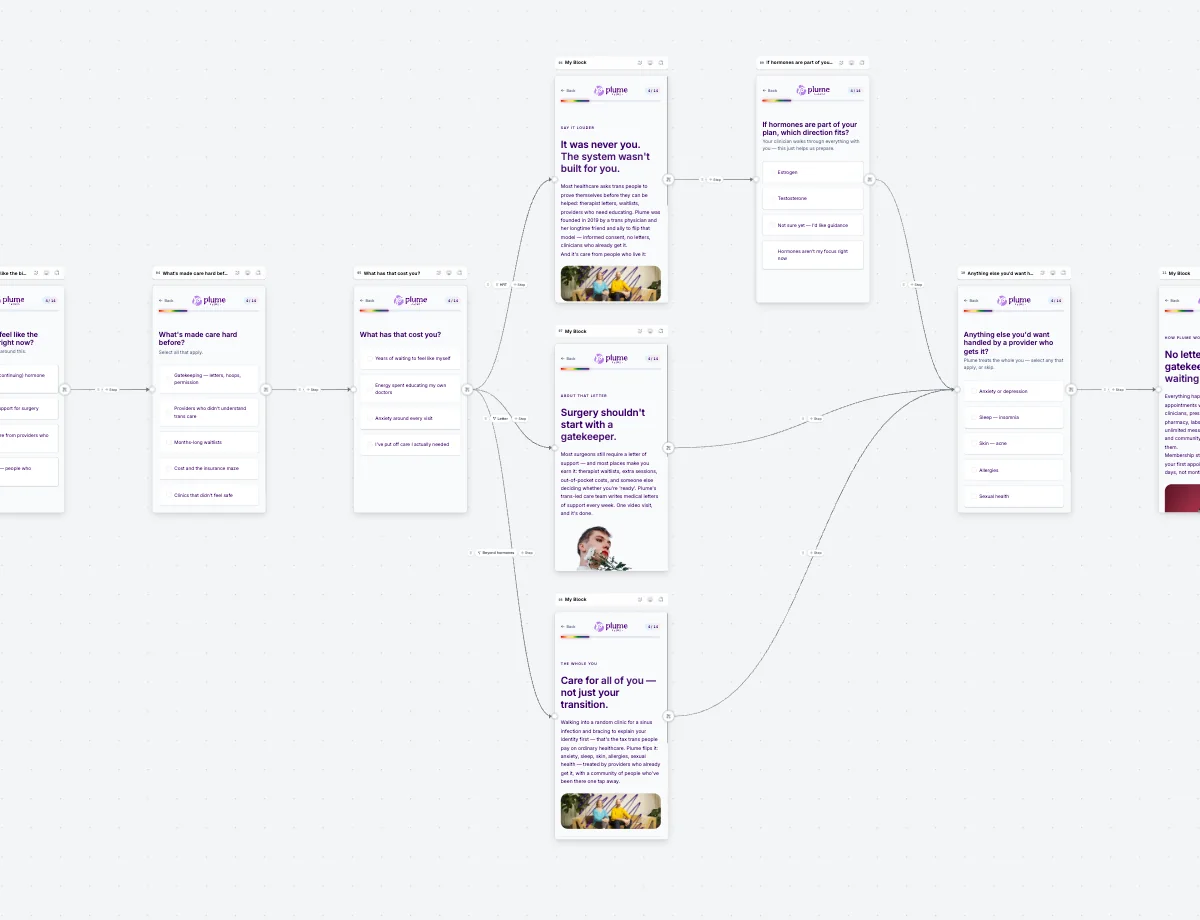 Routing on the PathwAI canvas.
Best for: telehealth and DTC health brands that acquire patients online and need eligibility, intake, consent, checkout and attribution in one flow.
PathwAI is an AI-native patient acquisition platform. You describe a program in plain English and an AI agent drafts the complete flow: steps, patient-facing copy and routing. The result is a draft. Your team reviews it on the visual canvas, and nothing publishes without explicit approval. No patient data or PHI is used in generation prompts.
Strengths:
- Routing rules branch on any answer or combination of answers. Eligible patients go on to intake and checkout; ineligible patients get a custom message, a waitlist or another treatment path. Your clinicians set the criteria.
- Consent is a first-class step. Patients must acknowledge before continuing, and the consent is timestamped and stored with the intake data.
- Field types built for health intake: BMI calculators, medication lists and screening instruments, alongside multiple choice, dates, file upload and free text.
- Steps take payments (Stripe, Authorize.Net), book appointments (Cal.com), verify ID (Persona) and analyze a photo with AI Scan on the customer’s own model key.
- The Data Platform sends conversions server-side to Meta, Google Ads, TikTok and Microsoft Ads. Email and phone are SHA-256 hashed, PHI such as date of birth and condition is stripped, and only visitors who consented are sent.
- Step-level completion and drop-off for every screen, plus A/B tests of copy, step order or routing.
Limitations: there is no public price, so you talk to sales first. The BAA is on the Enterprise plan only. PathwAI is not SOC 2 certified at this time. It is not an EHR, so records still live in your EHR or care platform. For a generic lead form outside healthcare it is more than you need.
Heyflow
Best for: marketing teams and agencies that build many conversion funnels for paid traffic, in lead generation, ecommerce, recruiting, appointments and app installs.
Heyflow describes itself as a tool to “build and optimize high-converting funnels” and says its AI is trained on 150K funnels and $2B+ in ad spend. It builds funnels, landing pages, advertorials and quizzes, and offers an MCP server so you can build and edit flows from Claude, ChatGPT or Cursor.
Strengths:
- Self-serve plans with a 14-day free trial, no credit card needed.
- Advanced conditional logic and analytics on every plan. Heyflow says its built-in analytics show conversion rates, visits, submits, time to complete and page-level drop-offs.
- Native A/B testing on the Scale plan and above.
- More than 50 native integrations, according to Heyflow, including HubSpot, Salesforce, Zapier, webhooks, Google Analytics and Google Tag Manager, plus Meta Pixel, Meta Conversions API, TikTok Pixel and LinkedIn Insight Tag.
- Payments inside the funnel, powered by Stripe or Solidgate, from the Growth plan.
- Its trust center lists SOC 2 Type II, ISO 27001:2022, GDPR and HIPAA.
On HIPAA: Heyflow’s help center says it “supports HIPAA compliance” for customers who process or store PHI on the platform, and that it “offers to sign a Business Associate Agreement (BAA) when applicable.” Its release notes date that HIPAA support to July 2025. The pricing page does not say which plan includes it; the Scale plan lists “Advanced security” and Enterprise lists “Custom Enterprise security”, so ask sales which plan your BAA requires.
Limitations for health intake: Heyflow is built for every industry, so health-specific pieces are yours to assemble. The pages we read do not describe a consent step stored as a record, or how health data is kept out of the events sent to ad platforms. Its help center says all data is hosted and processed in Europe, which a US health brand should raise with its compliance team. Plans are capped by responses (50 a month on Starter, 1,000 on Scale), with extra responses at $0.20 each.
Heyflow pricing
Heyflow publishes its prices. In October 2026 its pricing page listed:
| Plan | Billed yearly | Billed monthly | Responses per month | Funnels | Seats |
|---|---|---|---|---|---|
| Starter | $29/month | $39/month | 50 | 5 | 1 |
| Growth | $99/month | $149/month | 250 | 10 | 2 |
| Scale | $299/month | $369/month | 1,000 | 20 | 4 |
| Enterprise | from $1,100/month | Contact sales | More than 5,000 | Unlimited | Custom |
Heyflow also sells add-on bundles, such as a Security bundle at $35 a month, and prices exclude VAT. PathwAI has no public list price: pricing is scoped to your volume, integrations and compliance needs, and usually starts with a short pilot.
Head to head
Eligibility and routing
Both tools branch on answers. The difference is what the branches are for. In a Heyflow lead funnel, logic qualifies a lead and decides which page comes next. In a PathwAI intake, routing carries out eligibility criteria your clinicians wrote: a BMI threshold, a contraindicated medication, an age limit. An ineligible patient is not just dropped; they get a message, a waitlist or another treatment path.
Consent
PathwAI treats consent as its own step that a patient must acknowledge, with a timestamp stored alongside the intake. On Heyflow you can build a checkbox screen, but the pages we read do not describe consent as a stored record. If your legal team needs proof of what a patient agreed to and when, ask Heyflow how it records that.
Checkout
Both take payments inside the flow. PathwAI supports Stripe and Authorize.Net; Heyflow uses Stripe or Solidgate from its Growth plan. PathwAI also books appointments and verifies ID in the same flow, which matters for programs that require a consult or identity check before a prescription.
Ad tracking and PHI
This is the biggest difference for a health brand. Heyflow offers browser pixels for Meta, TikTok and LinkedIn, plus Meta Conversions API and server-side tracking, which is exactly what most lead funnels need. In a health funnel, a browser pixel on an intake page can carry answers about a condition to an ad platform. PathwAI uses no third-party ad pixels: the Data Platform sends conversions server-side, hashes identifiers, strips PHI and sends only visitors who consented. If you run Heyflow for health intake, check with your compliance team which events and fields leave each page.
Analytics and testing
Both show drop-off by step and run A/B tests. Heyflow puts native A/B testing on Scale. PathwAI includes step-level analytics and A/B testing of copy, step order or routing.
Building with AI
Both generate a funnel from a prompt. Heyflow’s AI is aimed at conversion across industries and runs on a credit allowance per plan. PathwAI’s agent writes a complete intake (steps, copy, routing) as a draft that your team approves; consent wording still needs review by your clinical or legal team.
When to choose Heyflow, and when to choose PathwAI
Choose Heyflow when:
- You are an agency or marketing team building funnels for many clients and industries.
- Your funnel collects contact details and qualification answers, not health information.
- You want to start on your own today with a published price and a free trial.
- You need data hosted in the EU.
Choose PathwAI when:
- Your funnel decides who is medically eligible for a treatment, using criteria your clinicians set.
- You need consent stored as a record, payment and booking in the same flow.
- You buy traffic on Meta, Google, TikTok or Microsoft and need conversions reported without sending health data.
- You want an agent to draft the first version and a non-technical team to run tests after launch.
How it works in PathwAI
- Describe the program to the AI agent, for example a GLP-1 intake with a BMI check, medication history, consent and a subscription checkout.
- Review the draft on the canvas. Adjust the routing to match your clinicians’ criteria and send a preview link for team review.
- Connect Stripe or Authorize.Net, Cal.com if a consult is booked, and your CRM or EHR, such as HubSpot or Healthie.
- Turn on the Data Platform so purchases and completed intakes go to your ad accounts server-side.
- Publish on your own domain or as an embed, then watch drop-off by step and test changes.
If you are also weighing other tools, see PathwAI vs Formsort and PathwAI vs Typeform.
Checklist before you choose
- Will the funnel collect any health information? If yes, get a signed BAA before launch.
- Ask which plan the BAA requires and what it costs.
- Ask where data is hosted and whether that works for your compliance team.
- List every event and field that leaves the funnel for an ad platform, and confirm no PHI is in it.
- Confirm how consent is recorded and whether you can export it.
- Check payments, booking and ID verification work in the same flow.
- Model the cost at your real monthly volume, not the trial.
Frequently asked questions
Is Heyflow HIPAA compliant?
Heyflow’s help center says it supports HIPAA compliance for customers who process or store PHI and offers to sign a BAA when applicable. No tool is HIPAA compliant on its own: compliance depends on a signed BAA and how you configure the funnel, including tracking.
Does Heyflow sign a BAA?
Heyflow says it offers to sign a Business Associate Agreement when applicable. Its pricing page does not name the plan that includes it, so confirm the plan with Heyflow’s sales team.
Can I use Heyflow for a telehealth intake?
Yes, if you have a BAA in place and your team builds the health-specific parts: eligibility logic, consent records and tracking that keeps PHI away from ad platforms. PathwAI includes those pieces for health brands.
Does PathwAI sign a BAA?
Yes, on the Enterprise plan. PathwAI is not SOC 2 certified at this time.
Which is cheaper?
Heyflow publishes prices starting at $29 a month billed yearly, with response limits per plan. PathwAI has no public list price and usually starts with a pilot, so compare quotes at your expected volume.
Disclosure: PathwAI publishes this article and is one of the tools compared.