
Mental health telehealth intake with PHQ-9 and GAD-7 screening
How to place PHQ-9 and GAD-7 in an online mental health intake: what they measure, scoring bands, item 9 safety routing to 988, consent and clinician review.
Written for operators, growth leads and clinical ops teams at mental health telehealth brands
A mental health telehealth intake should ask why the patient is here, then run the PHQ-9 (depression) and GAD-7 (anxiety) as one question per screen, score them as the patient goes, and route on the result before anyone sees a plan or a price. The one rule that overrides everything else: a positive answer on PHQ-9 item 9 (thoughts of being better off dead or of self-harm) must route the patient to crisis resources such as the 988 Suicide and Crisis Lifeline right away, and alert your clinical team. Scores support a clinician’s judgement; they never replace it, and your clinicians set every threshold the flow uses.
What are the PHQ-9 and GAD-7?
They are short, self-administered questionnaires that measure how often a patient has been bothered by depression or anxiety symptoms over the last two weeks. Both come from the same research group (Drs. Robert Spitzer, Janet Williams, Kurt Kroenke and colleagues) and both are scored the same way: each item is answered on a four-point scale from “Not at all” (0) to “Nearly every day” (3), and the item scores are added up.
- PHQ-9. Nine items, one for each of the DSM-IV criteria for major depression, for a total of 0 to 27. It was validated in a study of 6,000 patients in primary care and obstetrics-gynecology clinics, published by Kroenke, Spitzer and Williams in the Journal of General Internal Medicine in 2001 (PubMed).
- GAD-7. Seven items about generalized anxiety, for a total of 0 to 21. It was developed and validated in 15 US primary care clinics, published by Spitzer, Kroenke, Williams and Löwe in the Archives of Internal Medicine in 2006 (PubMed).
The forms themselves carry a plain licensing line: they were developed with an educational grant from Pfizer, and “no permission required to reproduce, translate, display or distribute.” Keep the wording and the answer scale exactly as published. Rewording an item to sound friendlier changes what it measures, and your clinicians lose the ability to compare the score with the literature.
Scoring bands from the original studies
The cutpoints below come from the papers, not from a vendor. Your clinical team decides how each band changes the patient’s path.
| Score | PHQ-9 severity | GAD-7 severity |
|---|---|---|
| 0 to 4 | Minimal | Minimal |
| 5 to 9 | Mild | Mild |
| 10 to 14 | Moderate | Moderate |
| 15 to 19 | Moderately severe | Severe (15 to 21) |
| 20 to 27 | Severe | Not applicable |
What the research says about those numbers:
- In the 2001 PHQ-9 study, scores of 5, 10, 15 and 20 represented mild, moderate, moderately severe and severe depression. A score of 10 or more had a sensitivity of 88% and a specificity of 88% for major depression against an interview by a mental health professional (PubMed).
- In the 2006 GAD-7 study, the authors identified a cut point with a sensitivity of 89% and a specificity of 82% for generalized anxiety disorder (PubMed).
- A 2010 systematic review by the same group put the optimal cutpoint at 10 or more on both the PHQ-9 and the GAD-7, and confirmed that 5, 10 and 15 represent mild, moderate and severe symptom levels on the GAD-7 as well (PubMed).
For the flow, your clinicians answer three questions: which bands are in scope for your service, what an out-of-scope score sees (a respectful message, a referral or a faster human review, never a dead end), and whether high scores jump the review queue. Scores measure severity; they do not diagnose.
The step structure
A typical online mental health intake runs in this order. Every step is one screen, and nothing before the screening asks for payment.
| Step | What it asks | Why it is here |
|---|---|---|
| 1. Reason for visit | Depression, anxiety, sleep, stress, something else | Sets the patient’s frame and decides which screeners to show |
| 2. Basics | State, age, preferred name | State licensure and age eligibility come first |
| 3. PHQ-9 | Nine items, one per screen or in short groups | Depression severity, plus the item 9 safety check |
| 4. GAD-7 | Seven items | Anxiety severity |
| 5. History and context | Current medications, past treatment, current therapist or prescriber | What the clinician needs before the first visit |
| 6. Result and plan | Plain-language summary and the next step your service offers | The patient sees where they are headed before committing |
| 7. Consent | Telehealth consent, privacy notice, any program terms | Captured and timestamped before account creation or payment |
| 8. Account and checkout or booking | Contact details, payment, appointment slot | Only once the patient is in scope |
| 9. Clinician review | Async or live review of the full record | A licensed clinician decides on care |
For the general principles behind step order and question pacing, see the HIPAA intake playbook and our piece on patient psychology in intake flows.
Placing PHQ-9 and GAD-7 in the flow
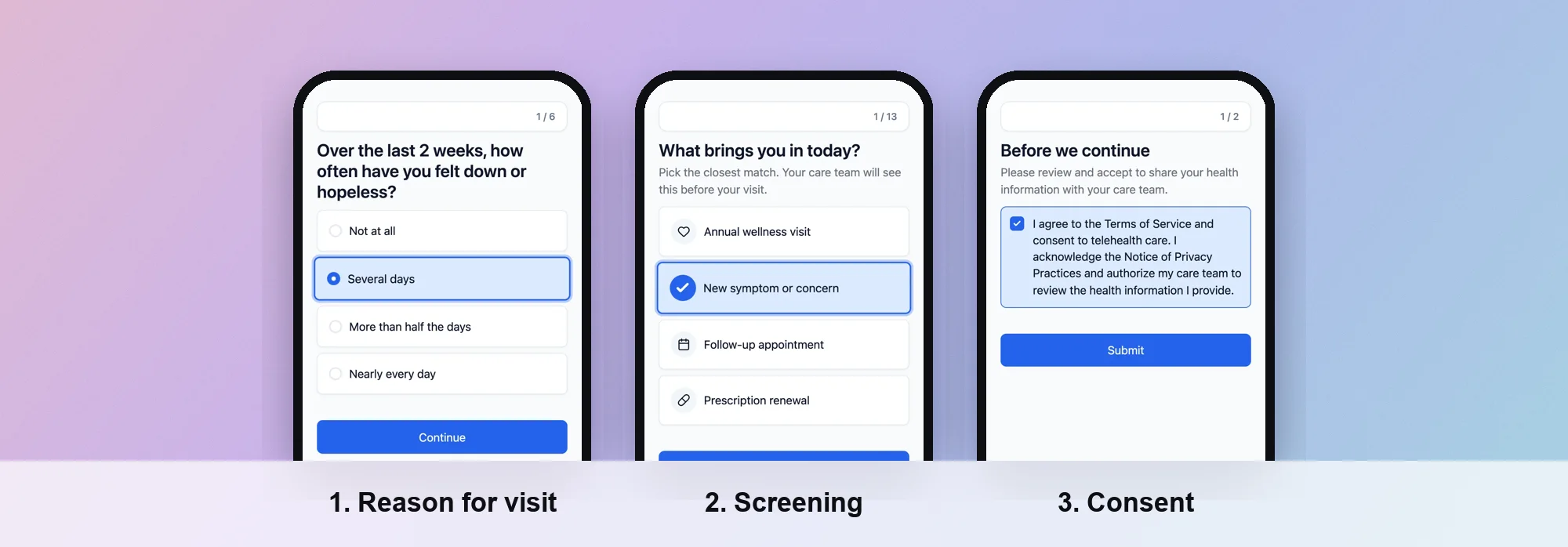 Screens from a PathwAI flow.
A few placement decisions matter more than the rest.
Put the screening after the reason for visit, not first. A patient who has just said they are here for anxiety understands why you are asking about worry.
Show the two-week frame on every screen. Both instruments ask about the last two weeks. On a phone, the stem scrolls away after the first item. Repeat it as a short line above each question so patients do not answer about their whole life.
Use the four published answers as buttons. “Not at all”, “Several days”, “More than half the days”, “Nearly every day”. Four large tap targets, in that order, every time. Do not add a “Prefer not to say” option inside the scored items; it breaks the total. If your clinicians want an opt-out, put it before the screener starts and route those patients to a human.
Decide whether to run both screeners for everyone. Some teams show only the screener that matches the reason for visit. Others run both, because depression and anxiety symptoms often occur together (the 2006 GAD-7 paper reports they frequently co-occurred). That is a clinical call.
Explain the result in plain words. After scoring, a simple summary (“Your answers suggest moderate anxiety symptoms over the last two weeks”) followed by the next step is easier to read than a number. Have your clinicians approve the exact wording for each band.
Item 9: the safety route
PHQ-9 item 9 asks how often, over the last two weeks, the patient has been bothered by “thoughts that you would be better off dead or of hurting yourself in some way.” This is the one answer that cannot wait for an async review.
Build the safety route before anything else in the flow, and test it first:
- Decide what counts as positive. Your clinicians set this. In this guide we assume any answer other than “Not at all” is flagged; set it to whatever your protocol says.
- Route immediately, not at the end. The branch should fire on the item 9 answer itself, not after the remaining questions. A patient in crisis should not have to finish a questionnaire.
- Show crisis resources on the next screen. The 988 Suicide and Crisis Lifeline can be reached by calling or texting 988, or by chat at chat.988lifeline.org, and its site says the service is available 24/7/365 (988lifeline.org). Add your clinicians’ guidance for immediate danger, which is to contact emergency services.
- Alert a human. The record should be tagged so your clinical team sees it at once, through whatever channel your protocol uses (a webhook to your EHR or care team tool, a priority queue, a page).
- Do not sell on that screen. No plan reveal, no checkout, no countdown timer. Whether the patient can continue into intake later is your clinicians’ decision.
- Log it. The answer, the time and the route taken belong in the intake record your clinicians review.
Consent and privacy
Screening answers are health information. Treat them that way from the first screen.
- Consent is its own step. Telehealth consent and the privacy notice go on a dedicated screen the patient must acknowledge before continuing. Store the timestamp with the intake record. Your clinical or legal team owns the consent text.
- Keep answers out of ad tools. Screening answers, scores and the reason for visit should never reach an ad platform. If you track conversions for paid acquisition, send them server-side with hashed identifiers and only for patients who consented. Our Data Platform is built for that, and our page on HIPAA explains how PathwAI handles health data.
- Sign a BAA with every vendor that stores the answers. That includes the intake tool, the EHR and any messaging or analytics tool that receives the data.
Clinician review
The flow collects; the clinician decides. A good handoff gives the reviewer:
- The PHQ-9 and GAD-7 totals and the band each falls in
- Every item answer, not just the totals, with item 9 called out
- The reason for visit, history, medications and current care
- Consent records with timestamps
- Any routing that happened (for example, a safety route that fired)
For async programs, see how the async consult flow passes a complete record to a clinician. Repeat the PHQ-9 and GAD-7 at follow-up visits if your clinicians use them to track change over time; the 2010 review describes the PHQ-9 as well established for measuring change, with evidence for the GAD-7 still emerging.
How to do it in PathwAI
PathwAI is an AI-native patient acquisition platform: an agent drafts the flow from a plain-English description, and your team reviews and approves it before anything goes live. For a mental health intake:
- Describe the program. For example: “Intake for an anxiety and depression telehealth program in these states. Reason for visit, PHQ-9 and GAD-7, history, consent, then booking.” The AI agent drafts the steps, copy and routing. Your clinical team checks every screener item against the published form.
- Score and route on answers. In the visual builder, routing rules branch on any answer or combination of answers. Set the item 9 branch to fire on the answer itself and send the patient to a crisis resource screen, and route on totals for the bands your clinicians define. Patients in scope continue to intake and booking; patients out of scope see a message, a referral or another path.
- Add consent as a step. Consent is a first-class step: patients must acknowledge before continuing, and the acknowledgement is timestamped and stored with the intake data.
- Connect the handoff. Send the completed record to your EHR or care team through an integration or a webhook, and book appointments with Cal.com from inside the flow.
- Watch each screen. Step-level analytics show completion and drop-off for every screen, so you can see whether patients stall in the screener or at consent, and A/B test the copy around it (never the validated items themselves).
The mental health page shows how this fits a full program. PathwAI is not an EHR or a practice-management system. If your team mainly needs to send scored measures to existing clients between sessions, SimplePractice is a practice-management option for therapists: it says clinicians can send assessments through its client portal and that the PHQ-9 and GAD-7 are scored automatically and plotted on a graph. PathwAI is built for the acquisition side, the path from an ad or website to a complete intake and a booked first visit.
Checklist
- PHQ-9 and GAD-7 items and answer scale copied exactly from the published forms
- Two-week frame visible on every screener screen
- Item 9 branch fires on the answer, routes to 988 and emergency guidance, and alerts a human
- Scoring bands and what each band sees approved by your clinicians
- No pricing or checkout before screening and consent
- Consent on its own step, timestamped and stored
- No screening answers or scores sent to ad platforms
- BAAs signed with every vendor that stores answers
- Clinician handoff includes every item answer, totals and routing taken
- Safety route tested end to end before launch
Frequently asked questions
Do we need permission to use the PHQ-9 and GAD-7 in our intake?
The published forms state that no permission is required to reproduce, translate, display or distribute them. Keep the items and answer scale unchanged, and have your clinical team confirm the version you use.
Can a PHQ-9 or GAD-7 score decide whether a patient is eligible?
A score can route a patient, but your clinicians set the rules and a licensed clinician makes the care decision. The questionnaires measure symptom severity; they do not diagnose.
What should happen when a patient answers item 9 positively?
Show crisis resources such as the 988 Suicide and Crisis Lifeline (call or text 988) immediately, alert your clinical team, and stop the sales path. Your clinicians define the exact protocol.
Should we show patients their score?
Many teams use a plain-language summary rather than a number. Whatever you show, have your clinicians approve the wording for each band.
Can we A/B test the screening questions?
Test the copy around the screener, the step order before it and the result screen. Do not change the validated items or answer options, or the scores stop meaning what the research says they mean.